Default cluster settings
This page describes the default configuration settings applied to Weaviate Cloud clusters. These settings control various aspects of your cluster's behavior, including database limits, authentication, backups, and usage metrics.
The majority of these settings are configured via environment variables. For more details on each environment variable, refer to the environment variable pages in the Deployment section of our documentation.
Weaviate Database settings
Section titled “Weaviate Database settings”These settings control core database functionality and limits. User configurable settings can be viewed and updated in "Show advanced options" in cluster details.
| Setting | Requires restart | Default value | User configurable |
|---|---|---|---|
MAXIMUM_ALLOWED_COLLECTIONS_COUNT |
No | 1000 | No |
AUTOSCHEMA_ENABLED |
No | true | Yes (2) |
MCP_SERVER_ENABLED |
No | true (always enabled on Weaviate Cloud) | No |
Enable MCP Read-Only (console setting) |
No | false | Yes (see Weaviate MCP server) |
ASYNC_REPLICATION_DISABLED |
No | false | No |
ASYNC_INDEXING |
Yes | true | No |
DEFAULT_QUANTIZATION |
No | RQ-8 | Yes (1) |
DEFAULT_VECTOR_INDEX |
No | Set by the cluster's optimization profile | Yes (via the optimization profile) |
DISABLE_GRAPHQL |
No | true (new clusters) | No |
CORS_ALLOW_ORIGIN |
Yes | https://console.weaviate.cloud | Yes (to allow any) (3) |
REPLICATION_MINIMUM_FACTOR |
Yes | 3 (for HA clusters) | No |
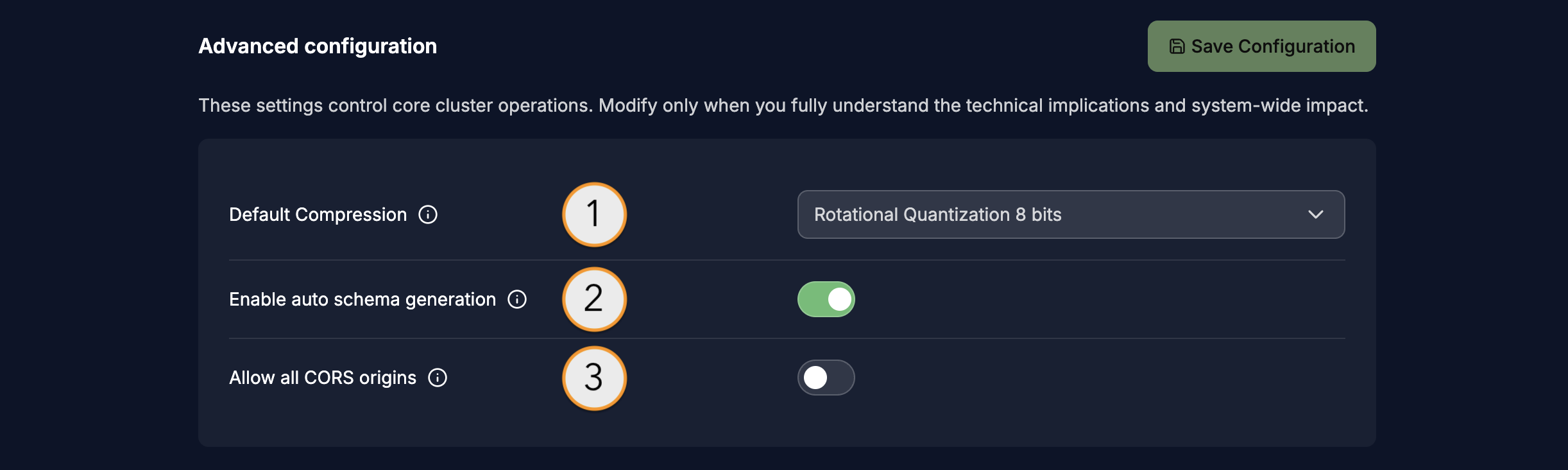
Update advanced options for Weaviate Cloud cluster.
User management & permissions
Section titled “User management & permissions”These settings control authentication and authorization for your cluster. These settings are not user configurable.
| Setting | Default value |
|---|---|
AUTHORIZATION_RBAC_ENABLED |
true |
AUTHENTICATION_DB_USERS_ENABLED |
true |
AUTHENTICATION_OIDC_ENABLED |
true |
For more information on authentication and authorization, see:
Backups
Section titled “Backups”Each Weaviate Cloud instance is automatically backed up daily by default. Additional backups can be triggered manually via the API.
Backups are retained per the applicable backup retention period of that cluster, such as 7 days for Flex Shared Cloud clusters.
To restore a backup, contact Weaviate Cloud support.
Query settings
Section titled “Query settings”These settings control default query behavior.
| Setting | Default value |
|---|---|
QUERY_DEFAULTS_LIMIT |
10 |
QUERY_MAXIMUM_RESULTS |
100000 |
Modules
Section titled “Modules”Weaviate Cloud clusters do not have a default vectorizer module configured. As a result, you must specify a vectorizer integration when creating collections, or import your own vectors.
To view the list of enabled modules on your cluster, see Cluster Status: Enabled Modules.
Support
Section titled “Support”If you use Weaviate Cloud (Database cluster(s) or Weaviate product in the cloud) or have a self-hosted support package, open a ticket in the Support Portal or email Weaviate support directly. To add a support plan, contact Weaviate sales.
Use the Support Portal for direct help from the Weaviate team: open and track tickets, and we'll respond in line with your support plan. The Community Forum is open to everyone, and a great place to ask questions, get help with your cluster, and connect with other developers. For all the ways to get help, see the Support overview.