Keyword Search (BM25)
Keyword search is an exact matching-based search using "tokens", or strings of characters.
It uses the BM25 algorithm, which ranks matching documents according to their relevance to a given search query. At a high level, the BM25 algorithm uses the count of query terms in the document (term frequency) against the overall frequency of the term in the dataset (inverse document frequency) to calculate a relevance score.
More specifically, Weaviate uses the BM25F algorithm, which extends BM25 to support using multiple fields in the search index.
A keyword search determines the best matches based on the matches of exact tokens contained in the query against those of the stored objects. As a result, a keyword search is a good choice when exact matches (e.g. exact domain-specific language, precise categories or tags) are important. For example:
- Searching for documents containing specific technical terms
- Identifying articles by precise keywords or tags
This differs from vector search, which finds semantically similar content even when the exact words don't match. You might use keyword search when precision is more important than finding related concepts.
Keyword search in Weaviate
Section titled “Keyword search in Weaviate”In Weaviate, a keyword search will return the objects best matching the query, as measured by BM25F "score".
A BM25 score is calculated based on the frequency of the query tokens in the object properties, as well as the length of the object properties and the query.
When an input string such as "A red Nike shoe" is provided as the query, Weaviate will:
- Tokenize the input (e.g. to
["a", "red", "nike", "shoe"]) - Remove any stopwords (e.g. remove
a, to produce["red", "nike", "shoe"]) - Determine the BM25 scores against selected properties of the database objects, based on the BM25 parameters and any property boosting.
- Return the objects with the highest BM25 scores as the search results
Tokenization
Section titled “Tokenization”Tokenization for keyword searches refers to how each source text is split up into individual "tokens" to be compared and matched.
The default tokenization method is word.
Other tokenization methods such as whitespace, lowercase, and field are available, as well as specialized ones such as gse or kagome_kr for other languages (more details).
Set the tokenization option in the inverted index configuration for a collection.
Text properties can also enable accent folding via textAnalyzer.asciiFold, which normalizes accented characters before tokens enter the inverted index. A document containing "Café Crème" becomes searchable as "cafe creme" (and vice versa), and the same rule applies to Equal and Like filters. See Inverted index: Accent folding for details.
Stopwords
Section titled “Stopwords”Stopwords are words that are filtered out before processing text.
Weaviate uses configurable stopwords in calculating the BM25 score. Any tokens that are contained in the stopword list will be ignored from the BM25 score calculation.
See the reference page for more details.
Stopword lists are also configurable per collection and per property. You can define custom presets on invertedIndexConfig.stopwordPresets and assign them to individual text properties via textAnalyzer.stopwordPreset. This is useful for multilingual collections. For example, English and French properties can use different stopword lists. Stopwords are still indexed and only filtered at query time, so changing your stopword configuration does not require reindexing. See Inverted index: Custom stopword presets for details.
BM25 parameters
Section titled “BM25 parameters”BM25 is a scoring function used to rank documents based on the query terms appearing in them. It has two main parameters that control its behavior:
k1(default: 1.2): Controls term frequency saturation. Higher values mean that multiple occurrences of a term continue to increase the score moreb(default: 0.75): Controls document length normalization. Values closer to 1 mean more normalization for document length
Set custom k1 and b values for a collection.
Keyword search operators
Section titled “Keyword search operators”Search operators define how many of the query tokens must match, and whether they must all match within a single searched property.
Conceptually, it works as though a filter is applied to the results of the BM25 score calculation. The available operators are:
and: All tokens must be present within a single searched propertyor: At least one token must be present within a single searched property, with the minimum number of tokens being configurable (minimumOrTokensMatch)and_cross: Every token must be matched by at least one of the searched properties, so the tokens can be spread across different properties. All searched properties must share the same tokenization and analyzer settings, otherwise the query fails with an error. (available fromv1.38.8)
As an example, a BM25 query of computer networking guide with the and operator would only return objects where all of the tokens computer, networking, and guide appear together within a single searched property. If the tokens are spread across different properties (for example, computer in title and networking guide in description), the object does not match under and. That restriction is specific to and; the same object does match under and_cross, which requires each token to appear in at least one of the searched properties rather than all of them in the same one. In contrast, the same query with the or operator would return objects where at least one of those tokens appears in a searched property. If the or operator is used with a minimumOrTokensMatch of 2, then at least two of the tokens must be present within a single searched property.
If not specified, the default operator is or, with a minimumOrTokensMatch of 1. This means that at least one token must be present in a searched property for the object to be returned.
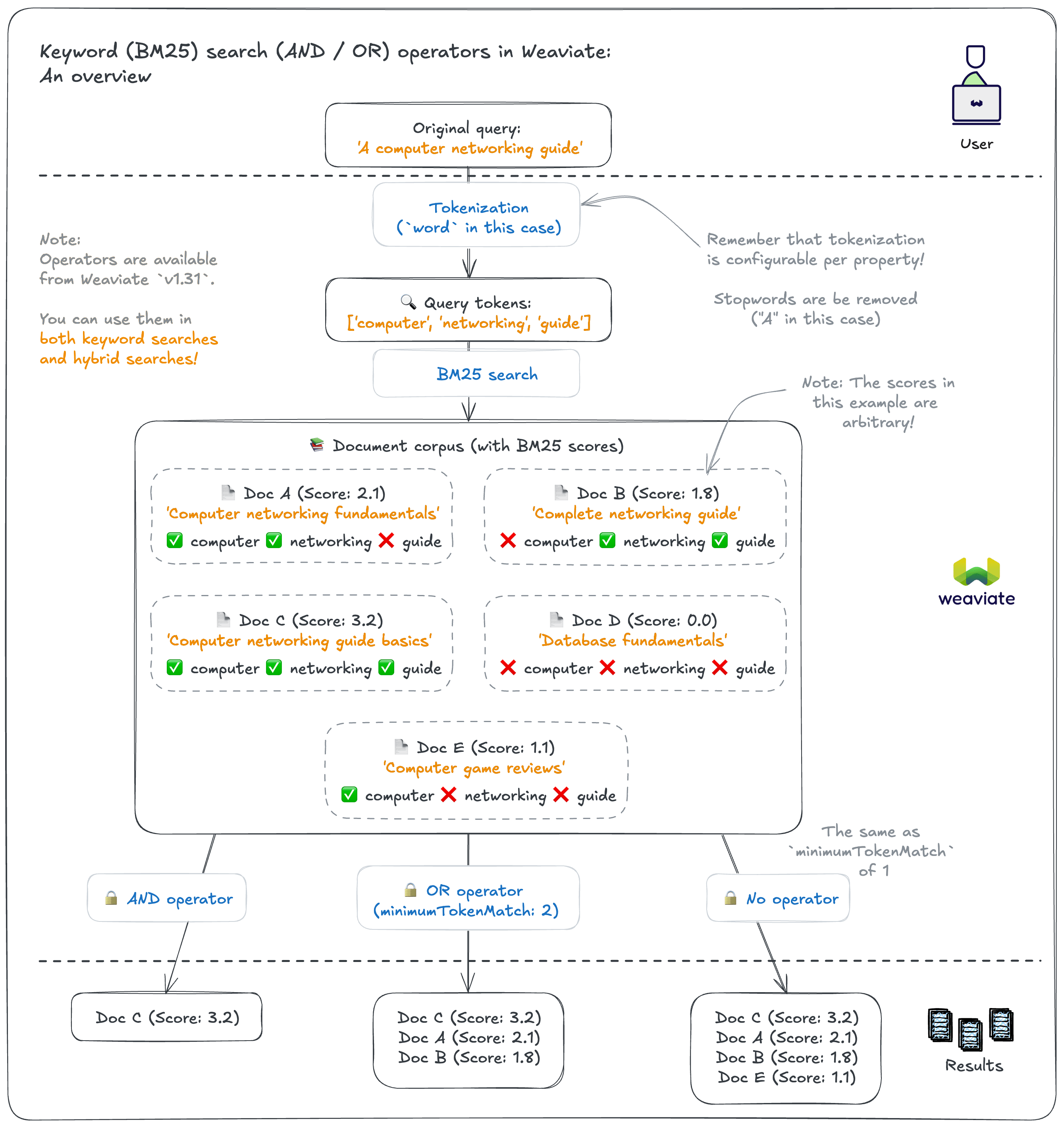
See the how-to page for details on usage.
Selected properties
Section titled “Selected properties”A BM25 query can optionally specify which object properties are to be included in the score calculations.
By default, all text properties are included in a BM25 calculation. There are two ways to vary this:
- In the collection configuration, set
indexSearchablefor a property tofalse. This property will then be ignored in all BM25 searches. - Specify which properties to search at query time. This will only apply for that particular query.
Property Boosting
Section titled “Property Boosting”Property boosting allows a query apply different weights to different properties when calculating the final BM25 score.
This is useful when certain properties are more important for search than others.
For example, when searching an e-commerce catalog, you could boost the title property and its categories over the product description.
Set the property weights at query time.
Combining with Vector Search
Section titled “Combining with Vector Search”Keyword search can be combined with vector search in Weaviate to perform a hybrid search. This allows you to leverage both:
- Exact matching capabilities of keyword search
- Semantic understanding of vector search
See Hybrid Search for more information.
Notes and Best Practices
Section titled “Notes and Best Practices”Here are some key considerations when using keyword search:
-
Tokenization Choice
- Choose based on your data and search requirements. For example, use
wordtokenization for natural language text, but considerfieldfor URLs or email addresses that need exact matching as a whole. - For multilingual content, consider specialized tokenizers like
gsefor Chinese/Japanese orkagome_krfor Korean - Consider special characters and case sensitivity needs
- Test your tokenization choice with subsets of your data and queries to ensure it handles special characters and case sensitivity as expected. You could perform these experiments with vectorization disabled to save resources/costs, as the two processes are independent.
- Choose based on your data and search requirements. For example, use
-
Performance Optimization
- Index only the properties you need for search
- Consider combining keyword search with vector search (i.e. perform a hybrid search) as a starting point, especially where you cannot anticipate users' behavior
-
Query Optimization
- Consider boosting properties that are more important for search (e.g. title, category) over others (e.g. description)
- Only modify
k1andbvalues if you have a good reason to do so, as the defaults are generally well-suited for most use cases
-
Debugging Tokenization
- Use the
/v1/tokenizeendpoint to inspect how text is tokenized before committing to a schema configuration. This is useful when experimenting with accent folding or custom stopword presets.
- Use the
Further resources
Section titled “Further resources”Questions and feedback
Section titled “Questions and feedback”Have a question or feedback? Here's how to reach us.