Administration
Disable Weaviate Embeddings
Section titled “Disable Weaviate Embeddings”Weaviate Embeddings is enabled by default at the organization level. To disable the Weaviate Embeddings service for your whole organization, follow these steps:
-
Open the Weaviate Cloud console.
-
Click on
Weaviate Embeddingsin the left sidebar (1). -
Use the toggle button
Enabledto either disable or enable the service. (2).
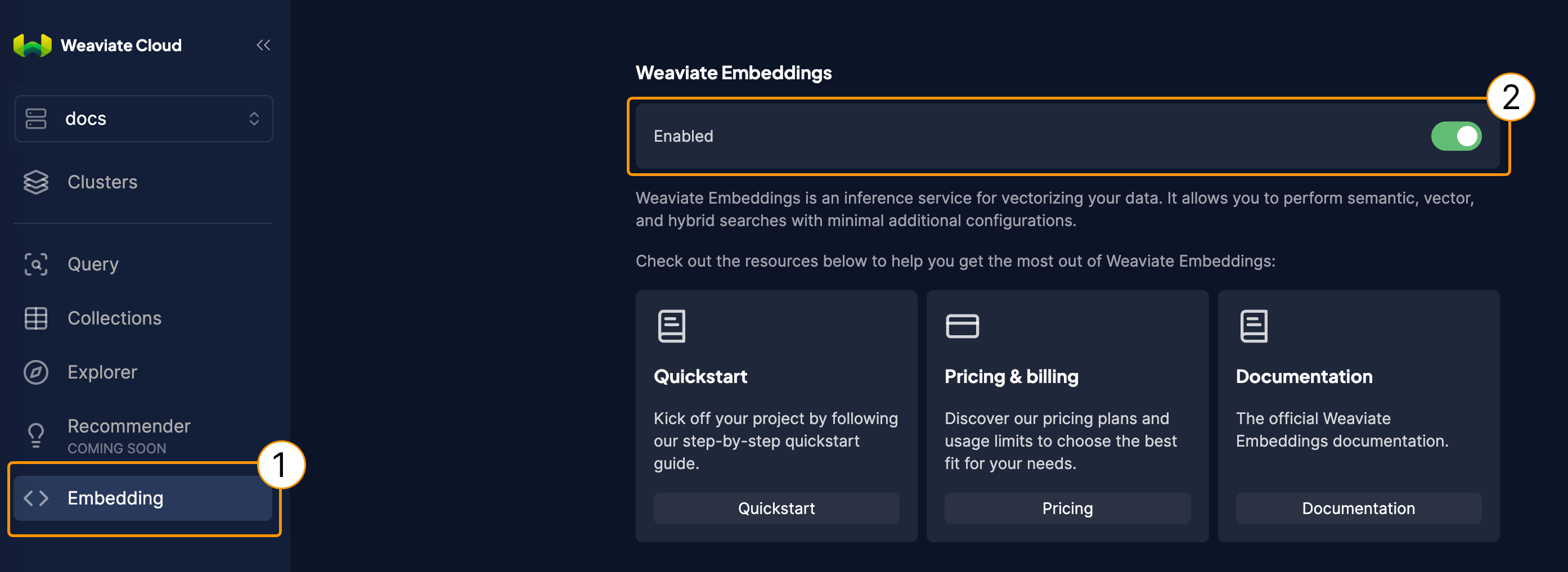
Disable Weaviate Embeddings globally.
Pricing and billing
Section titled “Pricing and billing”If you would like to learn about the pricing model, you can visit the Weaviate Embeddings product page. The pricing works on a per-token basis. This means that you will only be billed for the tokens that are successfully consumed. In other words, only requests that result in valid responses from the API are considered.
More info about billing in Weaviate Cloud can be found on this page.
Additional resources
Section titled “Additional resources”- Weaviate Embeddings: Overview
- Weaviate Embeddings: Quickstart
- Weaviate Embeddings: Choose a model
- Model provider integrations: Weaviate Embeddings
Support
Section titled “Support”If you use Weaviate Cloud (Database cluster(s) or Weaviate product in the cloud) or have a self-hosted support package, open a ticket in the Support Portal or email Weaviate support directly. To add a support plan, contact Weaviate sales.
Use the Support Portal for direct help from the Weaviate team: open and track tickets, and we'll respond in line with your support plan. The Community Forum is open to everyone, and a great place to ask questions, get help with your cluster, and connect with other developers. For all the ways to get help, see the Support overview.