Multi-vector embeddings (ColBERT, ColPali, etc.)
In this section, we will explore how to use multi-vector embeddings in Weaviate. Multi-vector embeddings (implemented through models like ColBERT, ColPali, or ColQwen) represent each object or query using multiple vectors instead of a single vector. This approach enables more precise searching through "late interaction" - a technique that matches individual parts of texts rather than comparing them as whole units.
Prerequisites
Section titled “Prerequisites”Before starting this tutorial, ensure you have the following:
- An instance of Weaviate (e.g. on Weaviate Cloud, or locally), version
v1.29or newer. - Your preferred Weaviate client library installed.
- An API key for Jina AI
- A free, "toy" key can be obtained from Jina AI.
Introduction
Section titled “Introduction”If you have used vector databases before, you may be familiar with the concept of a single vector representing an object. For example, the text "A very nice cat" could be represented by a vector such as:
[0.0412, 0.1056, 0.5021, ...]A multi-vector embedding, on the other hand, represents the same object using a set of nested, or two-dimensional vectors. For example, the text "A very nice cat" could be represented by a ColBERT embedding as:
[
    [0.0543, 0.1941, 0.0451, ...],
    [0.0123, 0.0567, 0.1234, ...],
    ...,
    [0.4299, 0.0491, 0.9811, ...]
]
The core idea behind this representation is that the meaning of different parts of the text can be captured by different vectors. For example, the first vector might represent the token "A", the second vector might represent the token "very", and so on.
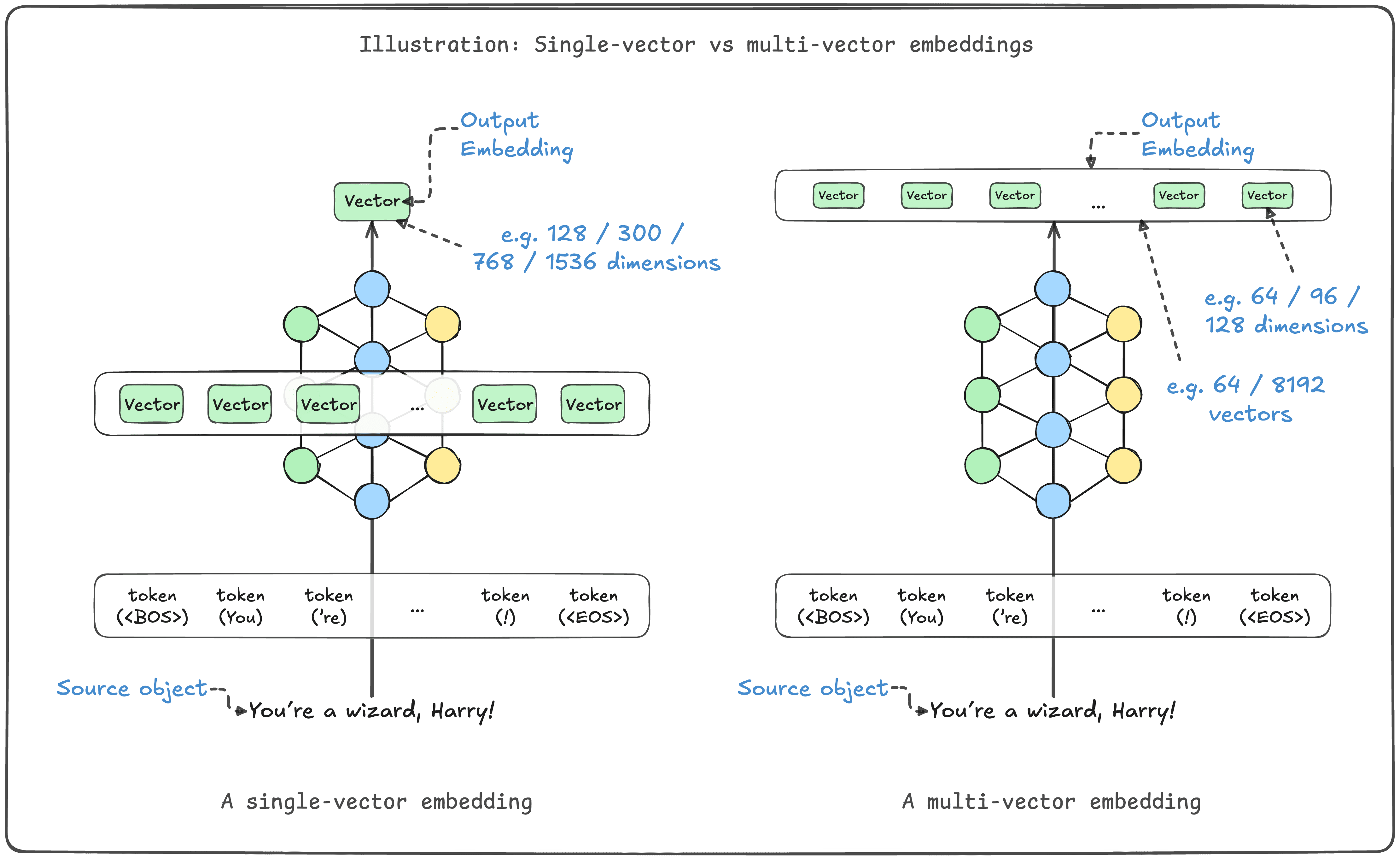
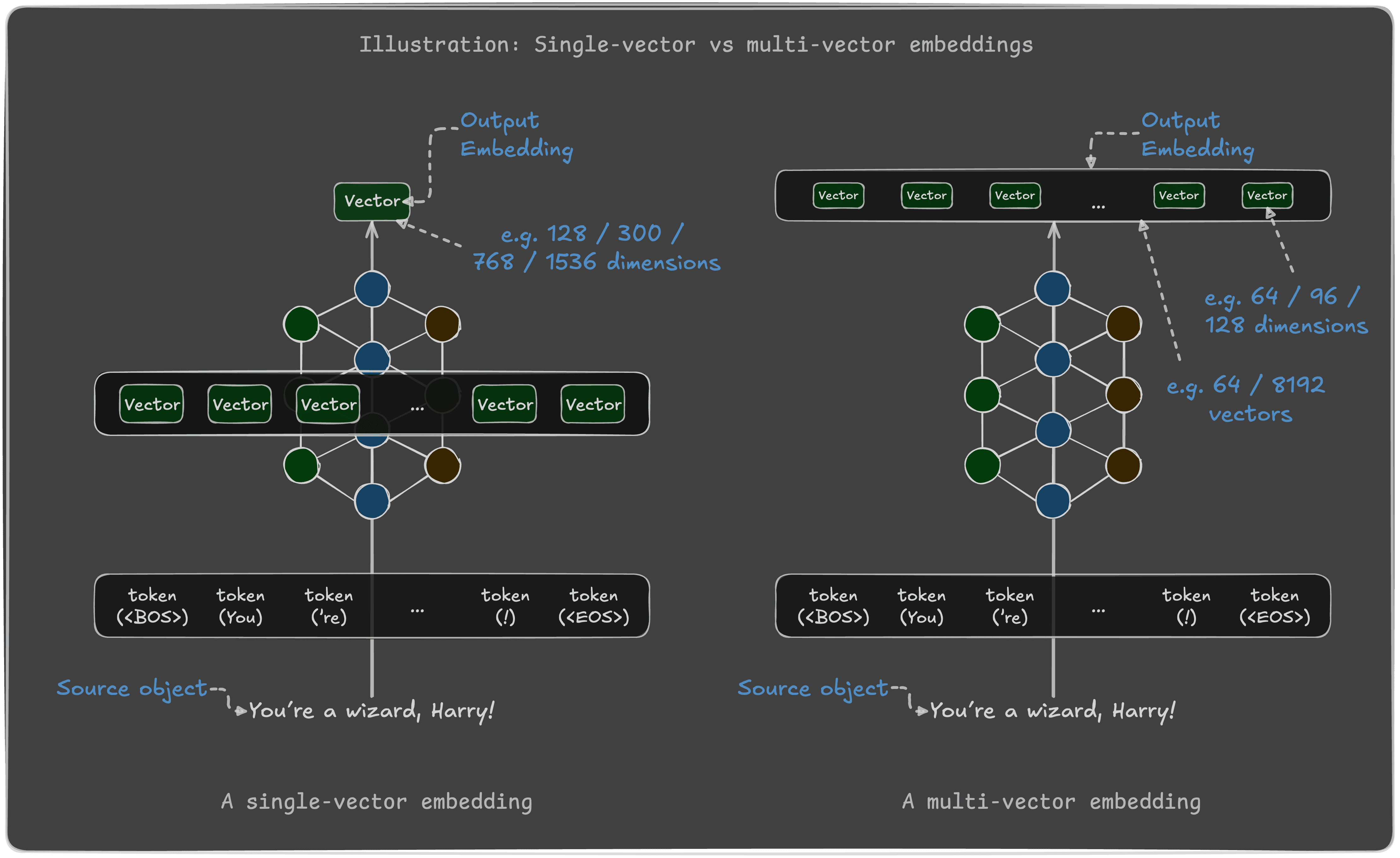
Multi-vector representations allow for more nuanced comparisons between objects, and therefore improved retrieval of similar objects.
Weaviate 1.29 introduces support for multi-vector embeddings, allowing you to store and search for objects using multi-vector embeddings.
This tutorial will show you how to use multi-vector embeddings in Weaviate, using either a ColBERT model integration (with JinaAI's model) or user-provided embeddings.
Jump to the section that interests you, or follow along with both.
When to use multi-vector embeddings
Section titled “When to use multi-vector embeddings”Multi-vector embeddings are particularly useful for search tasks where word order and exact phrase matching are important. This is due to multi-vector embeddings preserving token-level information and enabling late interaction. However, multi-vector embeddings will typically require more resources than single-vector embeddings.
Although each vector in a multi-vector embedding is smaller than a single-vector embedding, the total size of the multi-vector embedding typically larger, as each embedding contains many vectors. As an example, single-vector embedding of 1536 dimensions is (1536 * 4 bytes) = 6 kB, while a multi-vector embedding of 64 vectors of 96 dimensions is (64 * 96 * 4 bytes) = 25 kB - over 4 times larger.
Multi-vector embeddings therefore require more memory to store and more compute to search.
The inference time and/or cost for embedding generation may also be higher, as multi-vector embeddings require more compute to generate.
Therefore, multi-vector embeddings are best suited for tasks where the benefits of late interaction are important, and the additional resources required are acceptable.
Option 1: ColBERT model integration
Section titled “Option 1: ColBERT model integration”In this section, we will use Weaviate's model integration with JinaAI's ColBERT model to generate multi-vector embeddings for text data.
1.1. Connect to Weaviate
Section titled “1.1. Connect to Weaviate”First, connect to your Weaviate instance using your preferred client library. In this example, we assume you are connecting to a local Weaviate instance. For other types of instances, replace the connection details as needed (connection examples).
import os
import weaviateimport weaviate, { WeaviateClient} from 'weaviate-client'1.2. Collection configuration
Section titled “1.2. Collection configuration”Here, we define a collection called "DemoCollection". It has a named vector configured with the jina-colbert-v2 ColBERT model integration.
from weaviate.classes.config import Configure, Property, DataType
from weaviate.util import generate_uuid5import { generateUuid5, vectors, configure, dataType } from 'weaviate-client'1.3. Import data
Section titled “1.3. Import data”Now, we can import the data. For this example, we will import a few arbitrary text objects.
# An example dataset
documents = [
    {"id": "doc1", "text": "Weaviate is a vector database that is great for AI app builders."},
    {"id": "doc2", "text": "PyTorch is a deep learning framework that is great for AI model builders."},
    {"id": "doc3", "text": "For people building AI driven products, Weaviate is a good database for their tech stack."},
]

collection = client.collections.use(collection_name)

with collection.batch.fixed_size(batch_size=10) as batch:
    for doc in documents:
        # Iterate through the dataset & add to batch
        batch.add_object(
            properties={"text": doc["text"], "docid": doc["id"]},
            uuid=generate_uuid5(doc["id"]),
        )

# Check for errors in batch imports
if collection.batch.failed_objects:
    print(f"Number of failed imports: {len(collection.batch.failed_objects)}")
    print(f"First failed object: {collection.batch.failed_objects[0]}")

print(len(collection)) # This should print `3``// An example dataset
const documents = [
{"id": "doc1", "text": "Weaviate is a vector database that is great for AI app builders."},
{"id": "doc2", "text": "PyTorch is a deep learning framework that is great for AI model builders."},
{"id": "doc3", "text": "For people building AI driven products, Weaviate is a good database for their tech stack."},
]
const collection = client.collections.use(collectionName)1.3.1. Confirm embedding shape
Section titled “1.3.1. Confirm embedding shape”Let's retrieve an object and inspect the shape of its embeddings.
response = collection.query.fetch_objects(limit=3, include_vector=True)

print(f"Embedding data type: {type(response.objects[0].vector['multi_vector'])}")
print(f"Embedding first element type: {type(response.objects[0].vector['multi_vector'][0])}")
for i in range(3):
    # Inspect the shape of the fetched embeddings
    print(f"This embedding's shape is ({len(response.objects[i].vector['multi_vector'])}, {len(response.objects[i].vector['multi_vector'][0])})")
print()let response;Inspecting the results, each embedding is composed of a list of lists (of floats).
Embedding data type: <class 'list'>
Embedding first element type: <class 'list'>
This embedding's shape is (22, 128)
This embedding's shape is (25, 128)
This embedding's shape is (22, 128)
Note this in contrast to a single vector, which would be a list of floats.
1.4. Perform queries
Section titled “1.4. Perform queries”Now that we have imported the data, we can perform searches using the multi-vector embeddings. Let's see how to perform semantic, vector, and hybrid searches.
1.4.1. Near text search
Section titled “1.4.1. Near text search”Performing a near text, or semantic, search with a ColBERT embedding model integration is the same as with any other embedding model integration. The difference in embeddings' dimensionality is not visible to the user.
response = collection.query.near_text(
    query="A good database for AI app builders",
    target_vector="multi_vector",
)

for result in response.objects:
print(result.properties)let response;1.4.2. Hybrid search (simple)
Section titled “1.4.2. Hybrid search (simple)”Similarly to the near text search, a hybrid search with a ColBERT embedding model integration is performed in the same way as with other embedding model integrations.
response = collection.query.hybrid(
    query="A good database for AI app builders",
    target_vector="multi_vector",
)

for result in response.objects:
print(result.properties)let response;1.4.3. Vector search
Section titled “1.4.3. Vector search”When performing a manual vector search, the user must specify the query embedding. In this example, to search the multi_vector index, the query vector must be a corresponding multi-vector.
Since we use JinaAI's jina-colbert-v2 model in the integration, we obtain the embedding manually through JinaAI's API to make sure the query embedding is compatible with the object embeddings.
Obtain the embedding manually
def get_colbert_embedding(source_text: str):
    # As shown in https://jina.ai/api-dashboard/embedding
    # For this example, this only retrieves one embedding at a time
    import requests
    import json

    headers = {
        "Content-Type": "application/json",
        "Authorization": f"Bearer {jinaai_key}",
    }

    data = {
        "model": "jina-colbert-v2",
        "dimensions": 128,
        "input_type": "document",
        "embedding_type": "float",
        "input": [source_text],
    }

    response = requests.post(
        "https://api.jina.ai/v1/multi-vector", headers=headers, data=json.dumps(data)
    )

    response_data = json.loads(response.text)
    embedding = response_data["data"][0]["embeddings"]
return embeddingasync function getColbertEmbedding(sourceText: string) {
// As shown in https://jina.ai/api-dashboard/embedding
// For this example, this only retrieves one embedding at a time
const headers = {
"Content-Type": "application/json",
"Authorization": `Bearer ${jinaaiKey}`,
};
const data = {
"model": "jina-colbert-v2",
"dimensions": 128,
"input_type": "document",
"embedding_type": "float",
"input": [sourceText],
};
try {
const response = await fetch("https://api.jina.ai/v1/multi-vector", {
method: "POST",
headers: headers,
body: JSON.stringify(data)
});
if (!response.ok) {
throw new Error(`HTTP error! status: ${response.status}`);
}
const responseData = await response.json();
const embedding = responseData.data[0].embeddings;
return embedding;
} catch (error) {
console.error("Error fetching embedding:", error);
throw error;
}
}response = collection.query.near_vector(
near_vector=get_colbert_embedding("A good database for AI app builders"), # Raw ColBERT embedding, in [[e11, e12, e13, ...], [e21, e22, e23, ...], ...] shape
target_vector="multi_vector",
)
for result in response.objects:
print(result.properties)let response;1.4.4. Hybrid search (manual vector)
Section titled “1.4.4. Hybrid search (manual vector)”In all other searches where a vector embedding is to be specifically provided, it must be a multi-vector embedding, as with the manual vector search shown above.
response = collection.query.hybrid(
    query="A good database for AI app builders",
    vector=get_colbert_embedding("A good database for AI app builders"),  # Or any other raw ColBERT embedding
    target_vector="multi_vector",
)

for result in response.objects:
print(result.properties)let response;Option 2: User-provided embeddings
Section titled “Option 2: User-provided embeddings”In this section, we will use user-provided embeddings to populate Weaviate. This is useful when you want to use a different model than one that Weaviate integrates with.
2.1. Connect to Weaviate
Section titled “2.1. Connect to Weaviate”First, connect to your Weaviate instance using your preferred client library. In this example, we assume you are connecting to a local Weaviate instance. For other types of instances, replace the connection details as needed (connection examples).
import os
import weaviateimport weaviate, { WeaviateClient} from 'weaviate-client'2.2. Collection configuration
Section titled “2.2. Collection configuration”Here, we define a collection called "DemoCollection". Note that we do not use a model integration, as we will provide the embeddings manually.
The collection configuration explicitly enables the multi-vector index option. This is necessary to handle the multi-vector embeddings.
from weaviate.classes.config import Configure, Property, DataType
from weaviate.util import generate_uuid5import { generateUuid5, vectors, configure, dataType } from 'weaviate-client'2.3. Import data
Section titled “2.3. Import data”Now, we can import the data. For this example, we will import a few arbitrary text objects.
Note that in this example, each object is sent to Weaviate along with the corresponding multi-vector embedding. In the example, we obtain Jina AI's ColBERT embeddings, but it could be any multi-vector embeddings.
Obtain the embedding manually
def get_colbert_embedding(source_text: str):
    # As shown in https://jina.ai/api-dashboard/embedding
    # For this example, this only retrieves one embedding at a time
    import requests
    import json

    headers = {
        "Content-Type": "application/json",
        "Authorization": f"Bearer {jinaai_key}",
    }

    data = {
        "model": "jina-colbert-v2",
        "dimensions": 128,
        "input_type": "document",
        "embedding_type": "float",
        "input": [source_text],
    }

    response = requests.post(
        "https://api.jina.ai/v1/multi-vector", headers=headers, data=json.dumps(data)
    )

    response_data = json.loads(response.text)
    embedding = response_data["data"][0]["embeddings"]
return embeddingasync function getColbertEmbedding(sourceText: string) {
// As shown in https://jina.ai/api-dashboard/embedding
// For this example, this only retrieves one embedding at a time
const headers = {
"Content-Type": "application/json",
"Authorization": `Bearer ${jinaaiKey}`,
};
const data = {
"model": "jina-colbert-v2",
"dimensions": 128,
"input_type": "document",
"embedding_type": "float",
"input": [sourceText],
};
try {
const response = await fetch("https://api.jina.ai/v1/multi-vector", {
method: "POST",
headers: headers,
body: JSON.stringify(data)
});
if (!response.ok) {
throw new Error(`HTTP error! status: ${response.status}`);
}
const responseData = await response.json();
const embedding = responseData.data[0].embeddings;
return embedding;
} catch (error) {
console.error("Error fetching embedding:", error);
throw error;
}
}# An example dataset
documents = [
{"id": "doc1", "text": "Weaviate is a vector database that is great for AI app builders."},
{"id": "doc2", "text": "PyTorch is a deep learning framework that is great for AI model builders."},
{"id": "doc3", "text": "For people building AI driven products, Weaviate is a good database for their tech stack."},
]
collection = client.collections.use(collection_name)
with collection.batch.fixed_size(batch_size=10) as batch:
for doc in documents:
# Iterate through the dataset & add to batch
batch.add_object(
properties={"text": doc["text"], "docid": doc["id"]},
uuid=generate_uuid5(doc["id"]),
vector={"multi_vector": get_colbert_embedding(doc["text"])}, # Provide the embedding manually
)
# Check for errors in batch imports
if collection.batch.failed_objects:
print(f"Number of failed imports: {len(collection.batch.failed_objects)}")
print(f"First failed object: {collection.batch.failed_objects[0]}")
print(len(collection)) # This should print `3``// An example dataset
const documents = [
{"id": "doc1", "text": "Weaviate is a vector database that is great for AI app builders."},
{"id": "doc2", "text": "PyTorch is a deep learning framework that is great for AI model builders."},
{"id": "doc3", "text": "For people building AI driven products, Weaviate is a good database for their tech stack."},
]
const collection = client.collections.use(collectionName)2.4. Perform queries
Section titled “2.4. Perform queries”Now that we have imported the data, we can perform searches using the multi-vector embeddings. Let's see how to perform vector, and hybrid searches.
Note that near text search is not possible with user-provided embeddings. In this configuration, Weaviate is unable to convert a text query into a compatible embedding, without knowing the model used to generate the embeddings.
2.4.1. Vector search
Section titled “2.4.1. Vector search”You can perform a manual vector search, by specifying the query embedding. In this example, we convert the query into a vector using the same (JinaAI's jina-colbert-v2) model used to generate the object embeddings.
This ensures that the query embedding is compatible with the object embeddings.
Obtain the embedding manually
def get_colbert_embedding(source_text: str):
    # As shown in https://jina.ai/api-dashboard/embedding
    # For this example, this only retrieves one embedding at a time
    import requests
    import json

    headers = {
        "Content-Type": "application/json",
        "Authorization": f"Bearer {jinaai_key}",
    }

    data = {
        "model": "jina-colbert-v2",
        "dimensions": 128,
        "input_type": "document",
        "embedding_type": "float",
        "input": [source_text],
    }

    response = requests.post(
        "https://api.jina.ai/v1/multi-vector", headers=headers, data=json.dumps(data)
    )

    response_data = json.loads(response.text)
    embedding = response_data["data"][0]["embeddings"]
return embeddingasync function getColbertEmbedding(sourceText: string) {
// As shown in https://jina.ai/api-dashboard/embedding
// For this example, this only retrieves one embedding at a time
const headers = {
"Content-Type": "application/json",
"Authorization": `Bearer ${jinaaiKey}`,
};
const data = {
"model": "jina-colbert-v2",
"dimensions": 128,
"input_type": "document",
"embedding_type": "float",
"input": [sourceText],
};
try {
const response = await fetch("https://api.jina.ai/v1/multi-vector", {
method: "POST",
headers: headers,
body: JSON.stringify(data)
});
if (!response.ok) {
throw new Error(`HTTP error! status: ${response.status}`);
}
const responseData = await response.json();
const embedding = responseData.data[0].embeddings;
return embedding;
} catch (error) {
console.error("Error fetching embedding:", error);
throw error;
}
}response = collection.query.near_vector(
near_vector=get_colbert_embedding("A good database for AI app builders"), # Raw ColBERT embedding, in [[e11, e12, e13, ...], [e21, e22, e23, ...], ...] shape
target_vector="multi_vector",
)
for result in response.objects:
print(result.properties)let response;2.4.2. Hybrid search (manual vector)
Section titled “2.4.2. Hybrid search (manual vector)”To perform a hybrid search with user-provided embeddings, provide the query vector along with the hybrid query.
response = collection.query.hybrid(
    query="A good database for AI app builders",
    vector=get_colbert_embedding("A good database for AI app builders"),  # Or any other raw ColBERT embedding
    target_vector="multi_vector",
)

for result in response.objects:
print(result.properties)let response;Summary
Section titled “Summary”This tutorial showed how to use multi-vector embeddings in Weaviate.
Weaviate allows you to use multi-vector embeddings from v1.29, with either the ColBERT model integration, or by providing your own embeddings.
Note that when using multi-vector embeddings, the vector index may need to be manually configured to handle the multi-vector embeddings. This is because the shape of the embeddings is different from single-vector embeddings. This is automatically done when using a model integration such as ColBERT, but must be done manually when providing embeddings.
Once the data has been ingested, you can perform semantic, hybrid, and vector searches as usual. The main difference is in the shape of the embeddings, which must be taken into account when providing embeddings manually.
Further resources
Section titled “Further resources”Questions and feedback
Section titled “Questions and feedback”Have a question or feedback? Here's how to reach us.