Generative AI
Weaviate's integration with Anthropic's APIs allows you to access their models' capabilities directly from Weaviate.
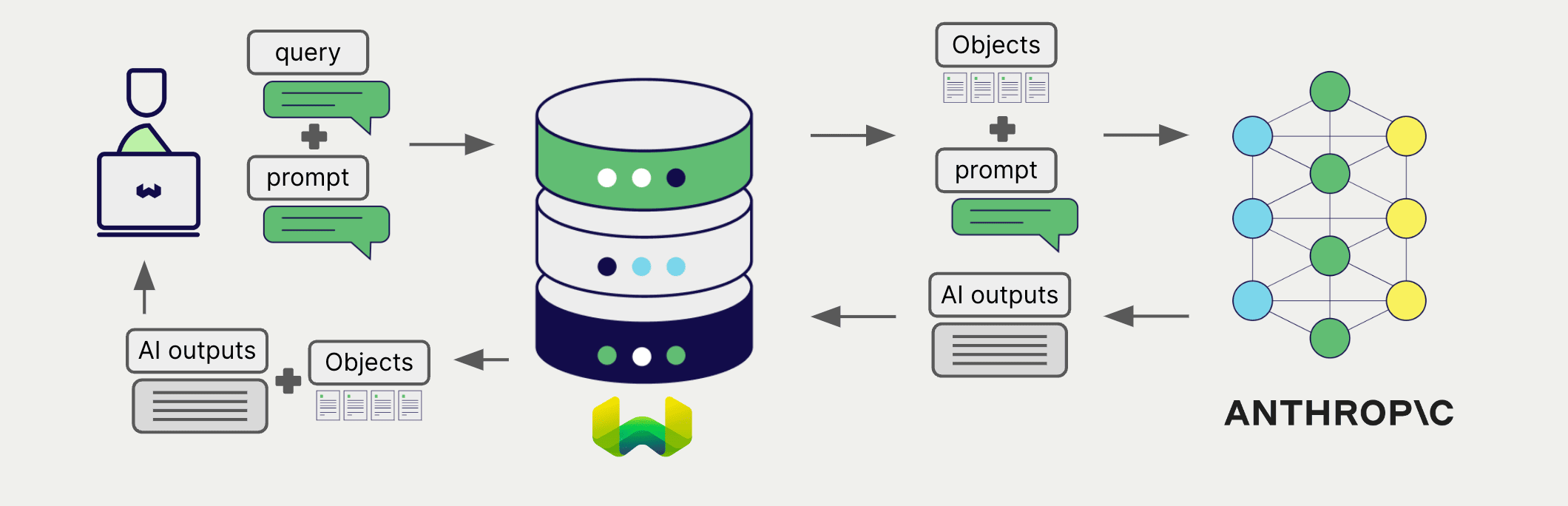
Configure a Weaviate collection to use a generative AI model with Anthropic. Weaviate will perform retrieval augmented generation (RAG) using the specified model and your Anthropic API key.
More specifically, Weaviate will perform a search, retrieve the most relevant objects, and then pass them to the Anthropic generative model to generate outputs.
Requirements
Section titled “Requirements”Weaviate configuration
Section titled “Weaviate configuration”Your Weaviate instance must be configured with the Anthropic generative AI integration (generative-anthropic) module.
For Weaviate Cloud (WCD) users
This integration is enabled by default on Weaviate Cloud (WCD) instances.
For self-hosted users
- Check the cluster metadata to verify if the module is enabled.
- Follow the how-to configure modules guide to enable the module in Weaviate.
API credentials
Section titled “API credentials”You must provide a valid Anthropic API key to Weaviate for this integration. Go to Anthropic to sign up and obtain an API key.
Provide the API key to Weaviate using one of the following methods:
- Set the
ANTHROPIC_APIKEYenvironment variable that is available to Weaviate. - Provide the API key at runtime, as shown in the examples below.
# Recommended: save sensitive data as environment variables
anthropic_key = os.getenv("ANTHROPIC_API_KEY")const anthropicApiKey = process.env.ANTHROPIC_API_KEY || ''; // Replace with your inference API keyConfigure collection
Section titled “Configure collection”Configure a Weaviate index as follows to use an Anthropic generative model:
from weaviate.classes.config import Configureclient.collections.create( "DemoCollection", generative_config=Configure.Generative.anthropic() # Additional parameters not shown)await client.collections.create({ name: 'DemoCollection', generative: weaviate.configure.generative.anthropic(), // Additional parameters not shown});Select a model
Section titled “Select a model”You can specify one of the available models for Weaviate to use, as shown in the following configuration example:
from weaviate.classes.config import Configureclient.collections.create( "DemoCollection", generative_config=Configure.Generative.anthropic( model="claude-haiku-4-5" ) # Additional parameters not shown)await client.collections.create({ name: 'DemoCollection', generative: weaviate.configure.generative.anthropic({ model: 'claude-haiku-4-5' }), // Additional parameters not shown});You can specify one of the available models for Weaviate to use. The default model is used if no model is specified.
Generative parameters
Section titled “Generative parameters”Configure the following generative parameters to customize the model behavior.
from weaviate.classes.config import Configureclient.collections.create( "DemoCollection", generative_config=Configure.Generative.anthropic( # # These parameters are optional # base_url="https://api.anthropic.com", # model="claude-haiku-4-5", # max_tokens=512, # temperature=0.7, # stop_sequences=["\n\n"], # top_p=0.9, # top_k=5, ) # Additional parameters not shown)await client.collections.create({ name: 'DemoCollection', generative: weaviate.configure.generative.anthropic({ // These parameters are optional // baseURL: 'https://api.anthropic.com', // model: 'claude-haiku-4-5', // maxTokens: 512, // temperature: 0.7, // stopSequences: ['\n\n'], // topP: 0.9, // topK: 5, }), // Additional parameters not shown});For further details on model parameters, see the Anthropic API documentation.
Select a model at runtime
Section titled “Select a model at runtime”Aside from setting the default model provider when creating the collection, you can also override it at query time.
from weaviate.classes.config import Configurefrom weaviate.classes.generate import GenerativeConfigcollection = client.collections.use("DemoCollection")response = collection.generate.near_text( query="A holiday film", limit=2, grouped_task="Write a tweet promoting these two movies", generative_provider=GenerativeConfig.anthropic( # # These parameters are optional # base_url="https://api.anthropic.com", # model="claude-haiku-4-5", # max_tokens=512, # temperature=0.7, # stop_sequences=["\n\n"], # top_p=0.9, # top_k=5, ), # Additional parameters not shown)import { generativeParameters } from 'weaviate-client';Header parameters
Section titled “Header parameters”You can provide the API key as well as some optional parameters at runtime through additional headers in the request. The following headers are available:
X-Anthropic-Api-Key: The Anthropic API key.X-Anthropic-Baseurl: The base URL to use (e.g. a proxy) instead of the default Anthropic URL.
Any additional headers provided at runtime will override the existing Weaviate configuration.
Provide the headers as shown in the API credentials examples above.
Retrieval augmented generation
Section titled “Retrieval augmented generation”After configuring the generative AI integration, perform RAG operations, either with the single prompt or grouped task method.
Single prompt
Section titled “Single prompt”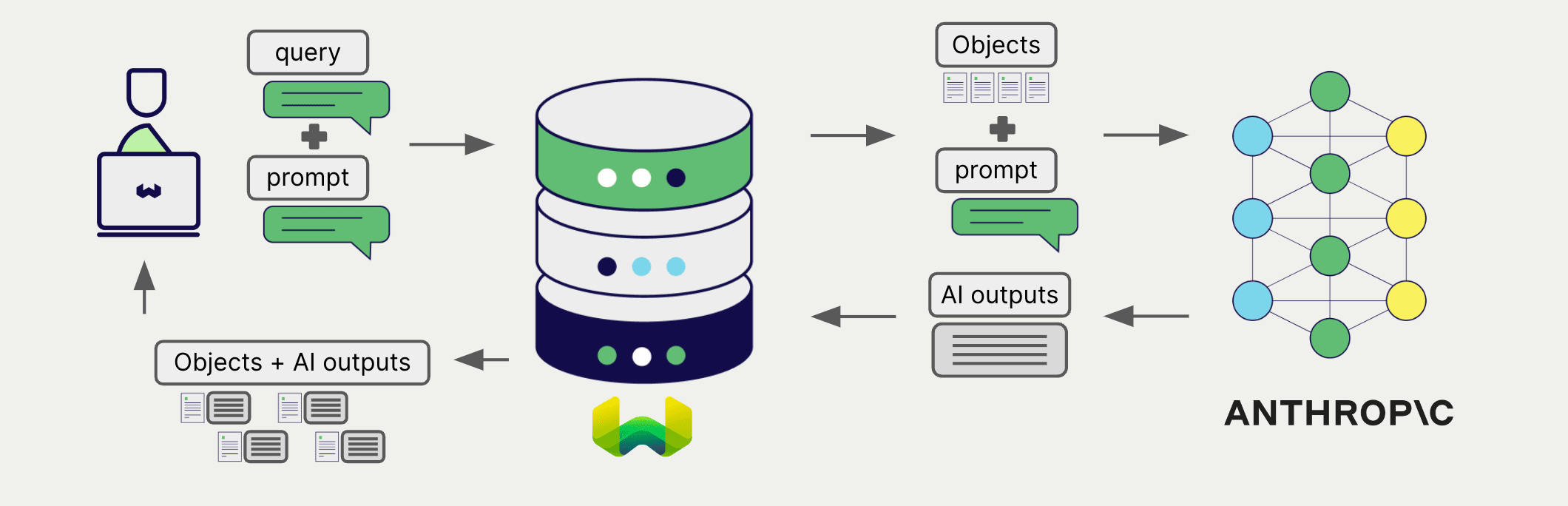
To generate text for each object in the search results, use the single prompt method.
The example below generates outputs for each of the n search results, where n is specified by the limit parameter.
When creating a single prompt query, use braces {} to interpolate the object properties you want Weaviate to pass on to the language model. For example, to pass on the object's title property, include {title} in the query.
collection = client.collections.use("DemoCollection")response = collection.generate.near_text( query="A holiday film", # The model provider integration will automatically vectorize the query single_prompt="Translate this into French: {title}", limit=2)for obj in response.objects: print(obj.properties["title"]) print(f"Generated output: {obj.generated}") # Note that the generated output is per objectlet response;
const myCollection = client.collections.use("DemoCollection");Grouped task
Section titled “Grouped task”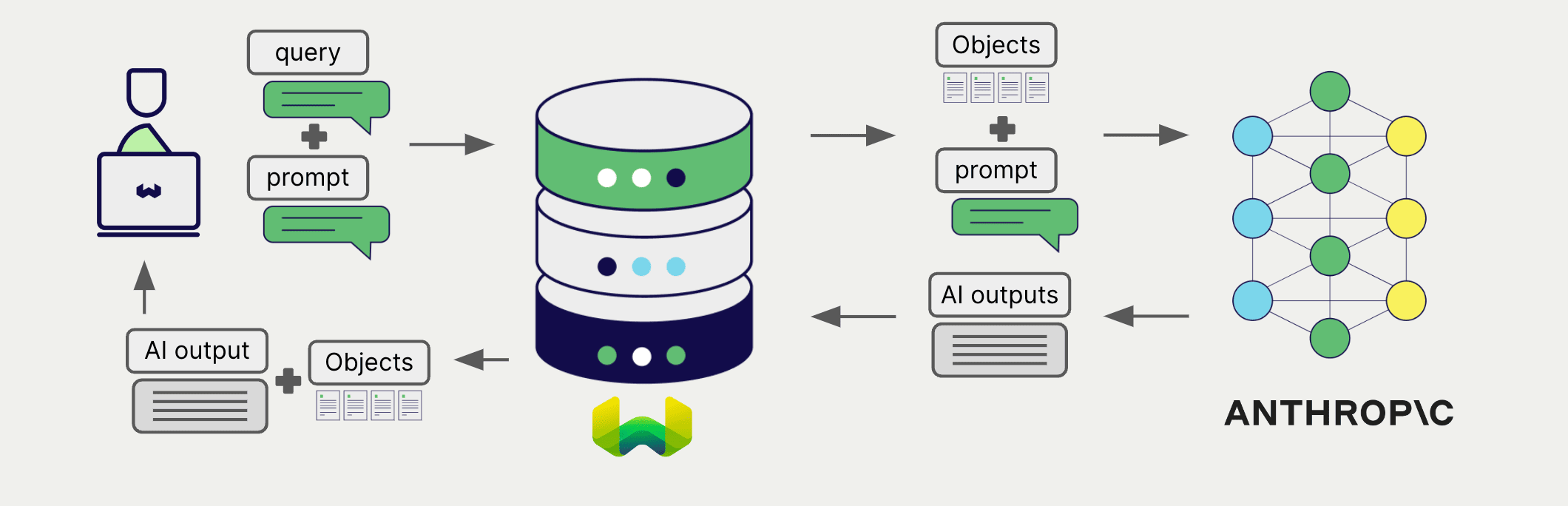
To generate one text for the entire set of search results, use the grouped task method.
In other words, when you have n search results, the generative model generates one output for the entire group.
collection = client.collections.use("DemoCollection")response = collection.generate.near_text( query="A holiday film", # The model provider integration will automatically vectorize the query grouped_task="Write a fun tweet to promote readers to check out these films.", limit=2)print(f"Generated output: {response.generative.text}") # Note that the generated output is per queryfor obj in response.objects: print(obj.properties["title"])let response;
const myCollection = client.collections.use("DemoCollection");RAG with images
Section titled “RAG with images”You can also supply images as a part of the input when performing retrieval augmented generation in both single prompts and grouped tasks.
import base64import requestsfrom weaviate.classes.generate import GenerativeConfig, GenerativeParameterssrc_img_path = "https://upload.wikimedia.org/wikipedia/commons/thumb/b/b0/Winter_forest_silver.jpg/960px-Winter_forest_silver.jpg"base64_image = base64.b64encode(requests.get(src_img_path).content).decode('utf-8')prompt = GenerativeParameters.grouped_task( prompt="Which movie is closest to the image in terms of atmosphere", images=[base64_image], # A list of base64 encoded strings of the image bytes # image_properties=["img"], # Properties containing images in Weaviate)jeopardy = client.collections.use("DemoCollection")response = jeopardy.generate.near_text( query="Movies", limit=5, grouped_task=prompt, generative_provider=GenerativeConfig.anthropic( max_tokens=1000 ),)# Print the source property and the generated responsefor o in response.objects: print(f"Title property: {o.properties['title']}")print(f"Grouped task result: {response.generative.text}")import { generativeParameters } from 'weaviate-client';References
Section titled “References”Maximum output tokens
Section titled “Maximum output tokens”Use the maxTokens parameter to set the maximum number of output tokens for the Anthropic Generative AI models. This parameter is separate from the maximum allowable input tokens, also called a "context window".
For most models, the default maxTokens value is 4096, which is the maximum, and the input (context window) size is 200,000. The specific allowable values may vary between models. Refer to the Anthropic documentation for the latest information.
Base URL
Section titled “Base URL”Note that for Anthropic, you can provide a custom base URL for the API endpoint. This is useful for users who have a dedicated API endpoint, or is behind a proxy.
The custom base URL can be provided via the collection configuration as shown above, or in the header of the request. To provide it in the header, instantiate the Weaviate client using the X-Anthropic-Baseurl key and the custom base URL as the value.
The default base URL is https://api.anthropic.com.
Available models
Section titled “Available models”Any model available in the Anthropic API can be used with Weaviate. If you do not specify a model, Weaviate uses claude-haiku-4-5 by default. That default was set in v1.34.0, and backported to v1.31.20, v1.32.17, and v1.33.5. Earlier releases on each of those lines default to claude-3-5-sonnet-20240620.
See the Anthropic API documentation for the most up-to-date list of available models.
Further resources
Section titled “Further resources”Code examples
Section titled “Code examples”Once the integrations are configured at the collection, the data management and search operations in Weaviate work identically to any other collection. See the following model-agnostic examples:
- The How-to: Manage collections and How-to: Manage objects guides show how to perform data operations (i.e. create, read, update, delete collections and objects within them).
- The How-to: Query & Search guides show how to perform search operations (i.e. vector, keyword, hybrid) as well as retrieval augmented generation.
References
Section titled “References”- Anthropic API documentation
Questions and feedback
Section titled “Questions and feedback”Have a question or feedback? Here's how to reach us.