Multimodal Embeddings
Weaviate Embeddings - Multimodal Embeddings
Section titled “Weaviate Embeddings - Multimodal Embeddings”Weaviate Cloud only
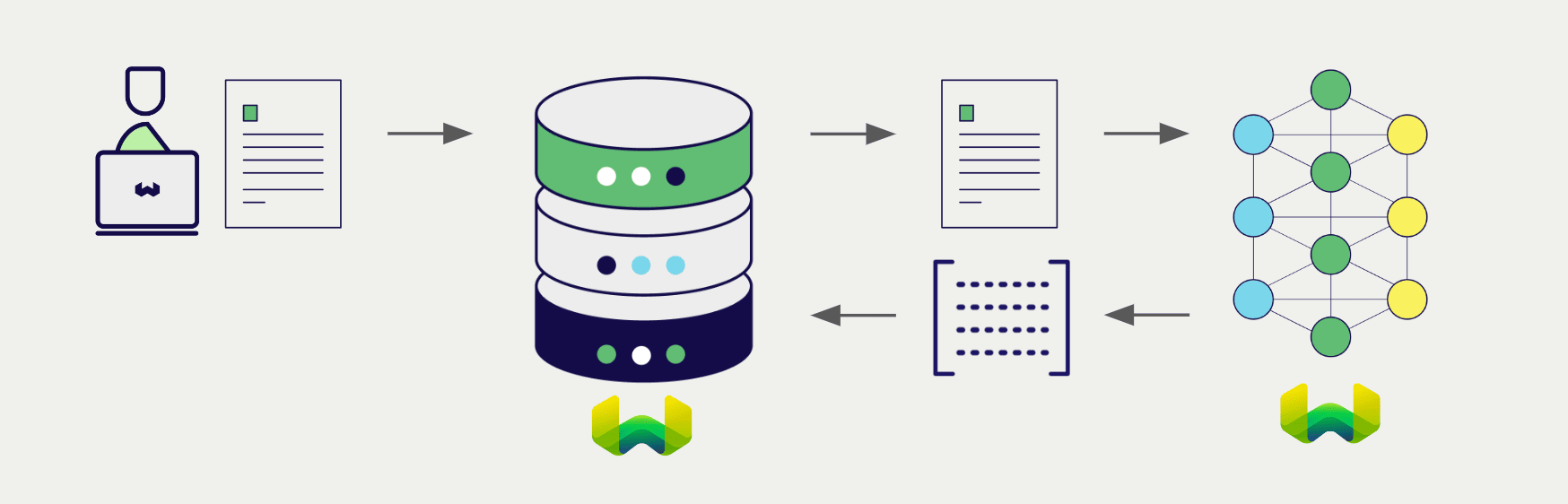
Configure a Weaviate vector index to use a Weaviate Embeddings model, and Weaviate will generate embeddings for various operations using the specified model and your Weaviate API key. This feature is called the vectorizer.
At import time, Weaviate generates image embeddings and saves them into the index. Then at search time, Weaviate converts text queries into embeddings.
Requirements
Section titled “Requirements”To use Weaviate Embeddings, you need a Weaviate Cloud instance with a Weaviate client library that supports Weaviate Embeddings.
API credentials
Section titled “API credentials”Your Weaviate Cloud credentials are automatically used to authorize your access to Weaviate Embeddings.
import weaviate
from weaviate.classes.init import Auth
import os

# Best practice: store your credentials in environment variables
weaviate_url = os.getenv("WEAVIATE_URL")
weaviate_key = os.getenv("WEAVIATE_API_KEY")

client = weaviate.connect_to_weaviate_cloud(
    cluster_url=weaviate_url,                     # Weaviate URL: "REST Endpoint" in Weaviate Cloud console
    auth_credentials=Auth.api_key(weaviate_key),  # Weaviate API key: "ADMIN" API key in Weaviate Cloud console
)

print(client.is_ready())  # Should print: `True`

# Work with Weaviate

client.close()import weaviate from 'weaviate-client'
// Best practice: store your credentials in environment variables
const weaviateUrl = process.env.WEAVIATE_URL as string; // Weaviate URL: "REST Endpoint" in Weaviate Cloud console
const weaviateApiKey = process.env.WEAVIATE_API_KEY as string; // Weaviate API key: "ADMIN" API key in Weaviate Cloud console
const client = await weaviate.connectToWeaviateCloud(
weaviateUrl,
{
authCredentials: new weaviate.ApiKey(weaviateApiKey),
}
)
// Work with Weaviate
client.close()// Best practice: store your credentials in environment variablesString weaviateUrl = System.getenv("WEAVIATE_URL");String weaviateApiKey = System.getenv("WEAVIATE_API_KEY");WeaviateClient client = WeaviateClient.connectToWeaviateCloud(weaviateUrl, // Replace with your // Weaviate Cloud URL weaviateApiKey // Replace with your Weaviate Cloud key);System.out.println(client.isReady()); // Should print: `True`client.close(); // Free up resources// Best practice: store your credentials in environment variablesstring weaviateUrl = Environment.GetEnvironmentVariable("WEAVIATE_URL");string weaviateApiKey = Environment.GetEnvironmentVariable("WEAVIATE_API_KEY");using var client = await Connect.Cloud( weaviateUrl, // Replace with your Weaviate Cloud URL weaviateApiKey // Replace with your Weaviate Cloud key);var meta = await client.GetMeta();Console.WriteLine(meta.Version);Configure the vectorizer
Section titled “Configure the vectorizer”Configure a Weaviate index as follows to use a Weaviate Embeddings multimodal model.
Configure one BLOB type property to hold the image data, and pass its name to the vectorizer configuration.
This model produces multi-vector embeddings, which represent each document with multiple vectors for fine-grained semantic matching. To manage memory usage effectively, we recommend enabling MUVERA encoding which compresses the multi-vectors into a single fixed-dimensional vector.
from weaviate.classes.config import Configure, Property, DataTypeclient.collections.create( "DemoCollection", properties=[ Property(name="doc_page", data_type=DataType.BLOB), ], vector_config=[ Configure.MultiVectors.multi2vec_weaviate( # name="document", # Optional: You can choose to name the vector image_field="doc_page", model="ModernVBERT/colmodernvbert", encoding=Configure.VectorIndex.MultiVector.Encoding.muvera( # Optional parameters for tuning MUVERA ksim=4, dprojections=16, repetitions=20, ), ) ],)await client.collections.create({ name: 'DemoCollection', properties: [ { name: 'doc_page', dataType: weaviate.configure.dataType.BLOB, }, ], vectorizers: [ weaviate.configure.multiVectors.multi2VecWeaviate({ // name: 'document', // Optional: You can choose to name the vector imageField: 'doc_page', model: 'ModernVBERT/colmodernvbert', encoding: weaviate.configure.vectorIndex.multiVector.encoding.muvera({ // Optional parameters for tuning MUVERA ksim: 4, dprojections: 16, repetitions: 20, }), }), ],});// Coming soon// Coming soon// Coming soonBasic configuration (without MUVERA)
If you prefer to store the raw multi-vector embeddings without MUVERA compression, use this configuration. Note that this will consume more memory.
from weaviate.classes.config import Configureclient.collections.create( "DemoCollection", properties=[ Property(name="doc_page", data_type=DataType.BLOB), # Define an image property # Any other properties can be defined here ], vector_config=[ Configure.MultiVectors.multi2vec_weaviate( name="document", image_field="doc_page" # Must provide the image property name here ) ], # Additional parameters not shown)await client.collections.create({ name: 'DemoCollection', properties: [ { name: 'doc_page', dataType: weaviate.configure.dataType.BLOB, }, ], vectorizers: [ weaviate.configure.multiVectors.multi2VecWeaviate({ name: 'document', imageField: 'doc_page', }), ],});// Coming soon// Coming soon// Coming soonVectorizer parameters
Section titled “Vectorizer parameters”The following parameters are available for the Weaviate Embeddings multimodal vectorizer:
base_url(optional): The base URL for the Weaviate Embeddings service. (Not required in most cases.)model(optional): The name of the model to use for embedding generation. Currently only one model is available.
Data import
Section titled “Data import”After configuring the vectorizer, import data into Weaviate. Weaviate generates embeddings for image objects using the specified model.
collection = client.collections.use("DemoCollection")with collection.batch.fixed_size(batch_size=200) as batch: for src_obj in source_objects: pages_b64 = url_to_base64(src_obj["page_img_path"]) weaviate_obj = { "title": src_obj["title"], "doc_page": pages_b64 # Add the image in base64 encoding } # The model provider integration will automatically vectorize the object batch.add_object( properties=weaviate_obj, # vector=vector # Optionally provide a pre-obtained vector )// Coming soonSearches
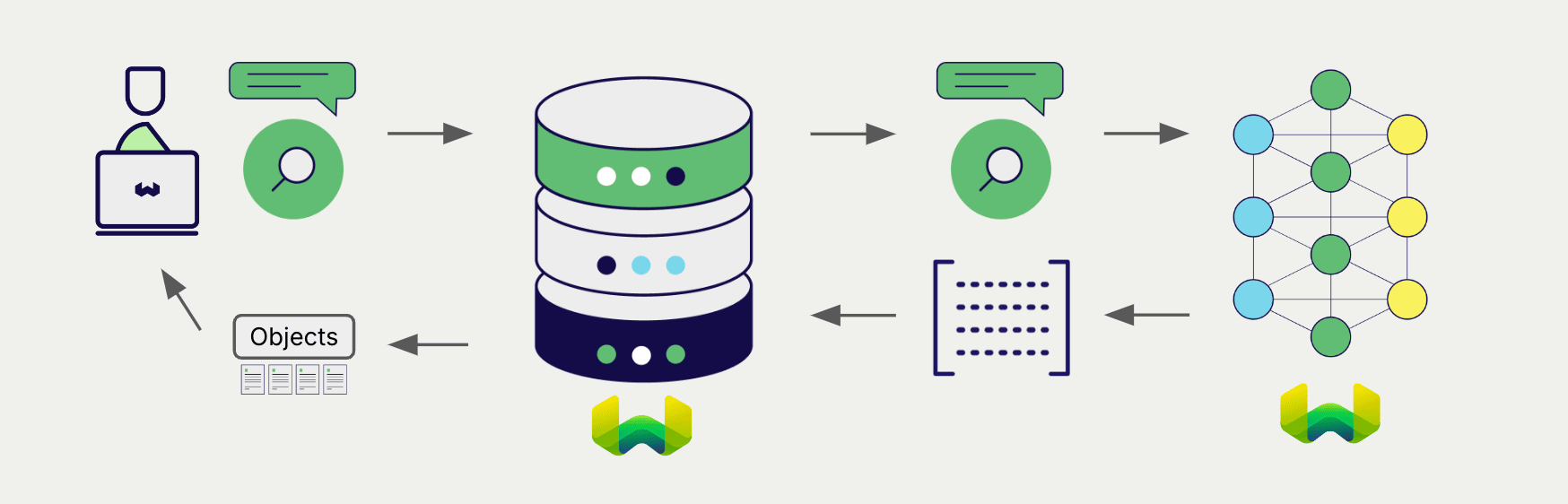
Section titled “Searches”Once the vectorizer is configured, Weaviate will perform vector and hybrid search operations using the specified model.
Vector (near text) search
Section titled “Vector (near text) search”When you perform a vector search, Weaviate converts the text query into an embedding using the specified model and returns the most similar objects from the database.
The query below returns the n most similar objects from the database, set by limit.
collection = client.collections.use("DemoCollection")response = collection.query.near_text( query="A holiday film", # The model provider integration will automatically vectorize the query limit=2)for obj in response.objects: print(obj.properties["title"])const collectionName = 'DemoCollection'
const myCollection = client.collections.use(collectionName)nearTextResponse, err := client.GraphQL().Get(). WithClassName("DemoCollection"). WithFields( graphql.Field{Name: "title"}, ). WithNearText(client.GraphQL().NearTextArgBuilder(). WithConcepts([]string{"A holiday film"})). WithLimit(2). Do(ctx)if err != nil { panic(err)}fmt.Printf("%v", nearTextResponse)CollectionHandle<Map<String, Object>> collection = client.collections.use("DemoCollection");var response = collection.query.nearText("A holiday film", // The model provider integration will automatically vectorize the query q -> q.limit(2).returnMetadata(Metadata.DISTANCE));for (var o : response.objects()) { System.out.println(o.properties().get("title"));}var collection = client.Collections.Use("DemoCollection");var response = await collection.Query.NearText( "A holiday film", // The model provider integration will automatically vectorize the query limit: 2, returnMetadata: MetadataOptions.Distance);foreach (var o in response.Objects){ Console.WriteLine(o.Properties["title"]);}Hybrid search
Section titled “Hybrid search”When you perform a hybrid search, Weaviate converts the text query into an embedding using the specified model and returns the best scoring objects from the database.
The query below returns the n best scoring objects from the database, set by limit.
collection = client.collections.use("DemoCollection")response = collection.query.hybrid( query="A holiday film", # The model provider integration will automatically vectorize the query limit=2)for obj in response.objects: print(obj.properties["title"])const collectionName = 'DemoCollection'
const myCollection = client.collections.use(collectionName)hybridResponse, err := client.GraphQL().Get(). WithClassName("DemoCollection"). WithFields( graphql.Field{Name: "title"}, ). WithHybrid(client.GraphQL().HybridArgumentBuilder(). WithQuery("A holiday film")). WithLimit(2). Do(ctx)if err != nil { panic(err)}fmt.Printf("%v", hybridResponse)CollectionHandle<Map<String, Object>> collection = client.collections.use("DemoCollection");QueryResponse<Map<String, Object>> response = collection.query.hybrid("A holiday film", // The model provider integration will automatically vectorize the query q -> q.limit(2).returnMetadata(Metadata.DISTANCE));for (var o : response.objects()) { System.out.println(o.properties().get("title"));}var collection = client.Collections.Use("DemoCollection");var response = await collection.Query.Hybrid( "A holiday film", // The model provider integration will automatically vectorize the query limit: 2, returnMetadata: MetadataOptions.Distance);foreach (var o in response.Objects){ Console.WriteLine(o.Properties["title"]);}Available models
Section titled “Available models”ModernVBERT/colmodernvbert
Section titled “ModernVBERT/colmodernvbert”- A 250M parameter late-interaction vision-language encoder, fine-tuned for visual document retrieval tasks.
- Generates multi-vector embeddings (ColBERT-style late-interaction) from document images and text queries.
- Ideal for getting documents directly into Weaviate without heavy preprocessing - no OCR or text extraction required.
- State-of-the-art performance in its size class, matching models up to 10x larger.
- Query token limit: 8,192 tokens
- Read more at the Hugging Face model card
- For integration details, see Weaviate Embeddings: Multimodal
Further resources
Section titled “Further resources”Code examples
Section titled “Code examples”Once the integrations are configured at the collection, the data management and search operations in Weaviate work identically to any other collection. See the following model-agnostic examples:
- The How-to: Manage collections and How-to: Manage objects guides show how to perform data operations (i.e. create, read, update, delete collections and objects within them).
- The How-to: Query & Search guides show how to perform search operations (i.e. vector, keyword, hybrid) as well as retrieval augmented generation.
Multi-vector embeddings
Section titled “Multi-vector embeddings”- Multi-vector encodings (MUVERA): Learn how to configure MUVERA parameters to balance memory usage and retrieval accuracy.
- Define multi-vector embeddings: Configure multi-vector embeddings in your collection.
References
Section titled “References”- Weaviate Embeddings Documentation
- Weaviate Embeddings Models
Pricing
Section titled “Pricing”Weaviate Embeddings models are charged based on token usage. For more pricing information, see the Weaviate Cloud pricing page.
Questions and feedback
Section titled “Questions and feedback”Have a question or feedback? Here's how to reach us.