Reranker
Weaviate's integration with NVIDIA's APIs allows you to access their models' capabilities directly from Weaviate.
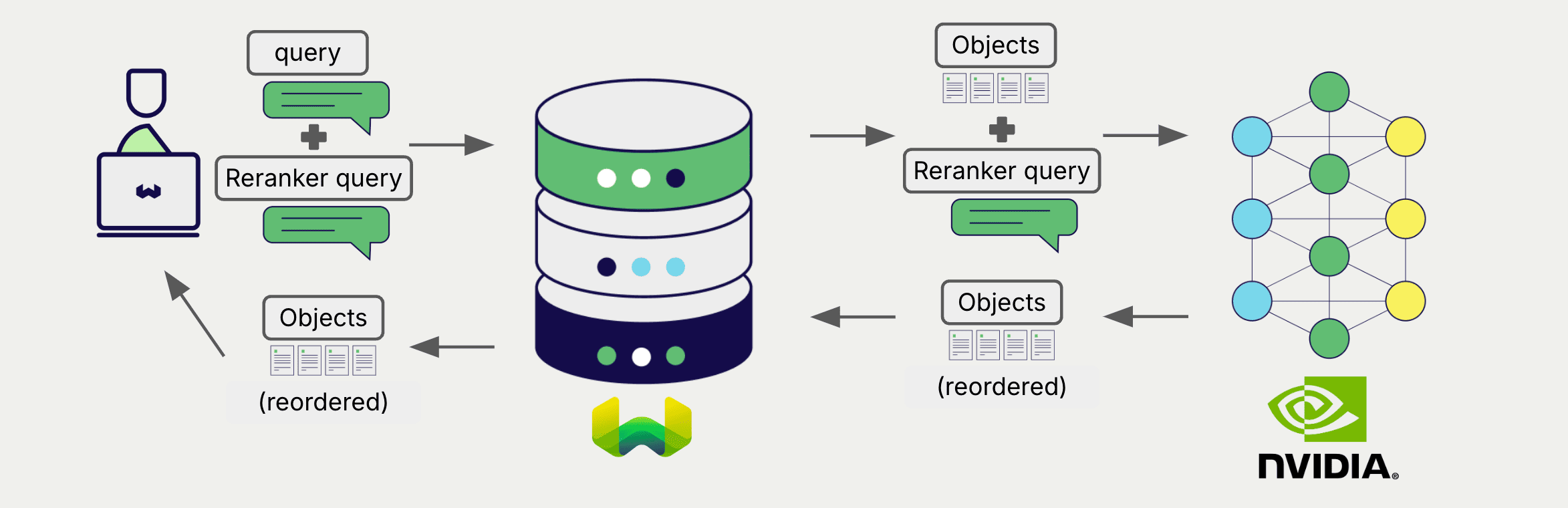
Configure a Weaviate collection to use an NVIDIA reranker model, and Weaviate will use the specified model and your NVIDIA NIM API key to rerank search results.
This two-step process involves Weaviate first performing a search and then reranking the results using the specified model.
Requirements
Section titled “Requirements”Weaviate configuration
Section titled “Weaviate configuration”Your Weaviate instance must be configured with the NVIDIA reranker integration (reranker-nvidia) module.
For Weaviate Cloud (WCD) users
This integration is enabled by default on Weaviate Cloud (WCD) instances.
For self-hosted users
- Check the cluster metadata to verify if the module is enabled.
- Follow the how-to configure modules guide to enable the module in Weaviate.
API credentials
Section titled “API credentials”You must provide a valid NVIDIA NIM API key to Weaviate for this integration. Go to NVIDIA to sign up and obtain an API key.
Provide the API key to Weaviate using one of the following methods:
- Set the
NVIDIA_APIKEYenvironment variable that is available to Weaviate. - Provide the API key at runtime, as shown in the examples below.
# Recommended: save sensitive data as environment variables
nvidia_key = os.getenv("NVIDIA_API_KEY")const nvidiaApiKey = process.env.NVIDIA_API_KEY || ''; // Replace with your inference API keyConfigure the reranker
Section titled “Configure the reranker”Configure a Weaviate collection to use an NVIDIA reranker model as follows:
from weaviate.classes.config import Configureclient.collections.create( "DemoCollection", reranker_config=Configure.Reranker.nvidia() # Additional parameters not shown)await client.collections.create({ name: 'DemoCollection', reranker: weaviate.configure.reranker.nvidia(),});Select a model
Section titled “Select a model”You can specify one of the available models for Weaviate to use, as shown in the following configuration example:
from weaviate.classes.config import Configureclient.collections.create( "DemoCollection", reranker_config=Configure.Reranker.nvidia( model="nvidia/llama-3.2-nv-rerankqa-1b-v2", base_url="https://integrate.api.nvidia.com/v1", ) # Additional parameters not shown)await client.collections.create({ name: 'DemoCollection', reranker: weaviate.configure.reranker.nvidia({ model: "nvidia/llama-3.2-nv-rerankqa-1b-v2", baseURL: "https://integrate.api.nvidia.com/v1" }),});The default model is used if no model is specified.
Reranking query
Section titled “Reranking query”Once the reranker is configured, Weaviate performs reranking operations using the specified NVIDIA model.
More specifically, Weaviate performs an initial search, then reranks the results using the specified model.
Any search in Weaviate can be combined with a reranker to perform reranking operations.
from weaviate.classes.query import Rerankcollection = client.collections.use("DemoCollection")response = collection.query.near_text( query="A holiday film", # The model provider integration will automatically vectorize the query limit=2, rerank=Rerank( prop="title", # The property to rerank on query="A melodic holiday film" # If not provided, the original query will be used ))for obj in response.objects: print(obj.properties["title"])let myCollection = client.collections.use('DemoCollection');const results = await myCollection.query.nearText( ['A holiday film'], { limit: 2, rerank: { property: 'title', // The property to rerank on query: 'A melodic holiday film' // If not provided, the original query will be used } });for (const obj of results.objects) { console.log(obj.properties['title']);}References
Section titled “References”Available models
Section titled “Available models”You can use any reranker model on NVIDIA NIM APIs with Weaviate.
The default model is nvidia/rerank-qa-mistral-4b.
Further resources
Section titled “Further resources”Other integrations
Section titled “Other integrations”- NVIDIA text embedding models + Weaviate.
- NVIDIA multimodal embedding models + Weaviate.
- NVIDIA generative models + Weaviate.
Code examples
Section titled “Code examples”Once the integrations are configured at the collection, the data management and search operations in Weaviate work identically to any other collection. See the following model-agnostic examples:
- The How-to: Manage collections and How-to: Manage objects guides show how to perform data operations (i.e. create, read, update, delete collections and objects within them).
- The How-to: Query & Search guides show how to perform search operations (i.e. vector, keyword, hybrid) as well as retrieval augmented generation.
References
Section titled “References”Questions and feedback
Section titled “Questions and feedback”Have a question or feedback? Here's how to reach us.