Text Embeddings
Weaviate's integration with Mistral's APIs allows you to access their models' capabilities directly from Weaviate.
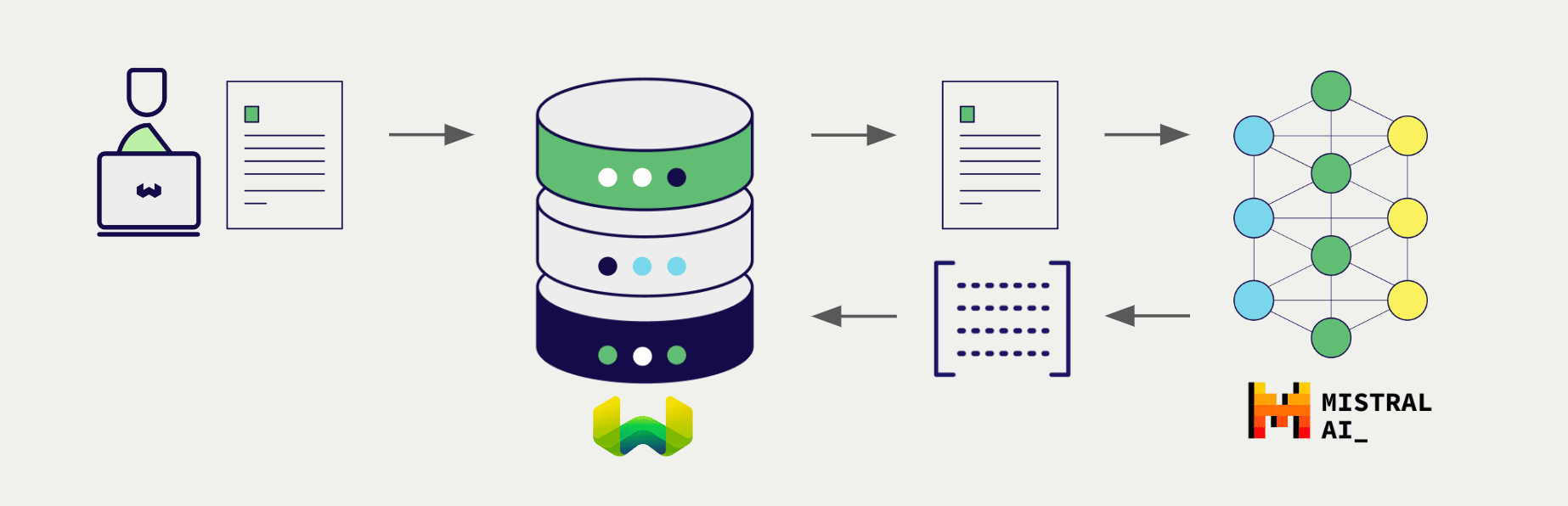
Configure a Weaviate vector index to use an Mistral embedding model, and Weaviate will generate embeddings for various operations using the specified model and your Mistral API key. This feature is called the vectorizer.
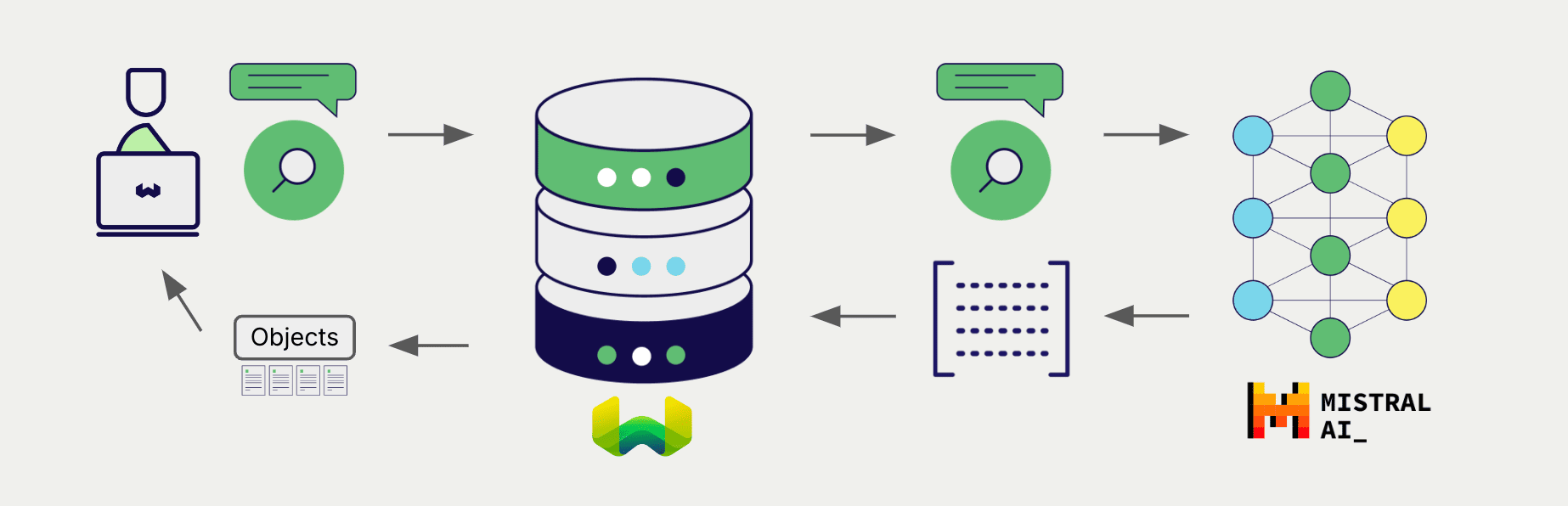
At import time, Weaviate generates text object embeddings and saves them into the index. For vector and hybrid search operations, Weaviate converts text queries into embeddings.
Requirements
Section titled “Requirements”Weaviate configuration
Section titled “Weaviate configuration”Your Weaviate instance must be configured with the Mistral vectorizer integration (text2vec-mistral) module.
For Weaviate Cloud (WCD) users
This integration is enabled by default on Weaviate Cloud (WCD) instances.
For self-hosted users
- Check the cluster metadata to verify if the module is enabled.
- Follow the how-to configure modules guide to enable the module in Weaviate.
API credentials
Section titled “API credentials”You must provide a valid Mistral API key to Weaviate for this integration. Go to Mistral to sign up and obtain an API key.
Provide the API key to Weaviate using one of the following methods:
- Set the
MISTRAL_APIKEYenvironment variable that is available to Weaviate. - Provide the API key at runtime, as shown in the examples below.
# Recommended: save sensitive data as environment variables
mistral_key = os.getenv("MISTRAL_API_KEY")const mistralApiKey = process.env.MISTRAL_API_KEY || ''; // Replace with your inference API key"X-Mistral-Api-Key": os.Getenv("MISTRAL_API_KEY"),Configure the vectorizer
Section titled “Configure the vectorizer”Configure a Weaviate index as follows to use an Mistral embedding model:
from weaviate.classes.config import Configureclient.collections.create( "DemoCollection", vector_config=[ Configure.Vectors.text2vec_mistral( name="title_vector", source_properties=["title"], ) ], # Additional parameters not shown)await client.collections.create({ name: 'DemoCollection', properties: [ { name: 'title', dataType: 'text' as const, }, ], vectorizers: [ weaviate.configure.vectors.text2VecMistral({ name: 'title_vector', sourceProperties: ['title'], }), ], // Additional parameters not shown});// Define the collectionbasicMistralVectorizerDef := &models.Class{ Class: "DemoCollection", VectorConfig: map[string]models.VectorConfig{ "title_vector": { Vectorizer: map[string]interface{}{ "text2vec-mistral": map[string]interface{}{ "properties": []string{"title"}, }, }, }, },}// add the collectionerr = client.Schema().ClassCreator().WithClass(basicMistralVectorizerDef).Do(ctx)if err != nil { panic(err)}Select a model
Section titled “Select a model”You can specify one of the available models for the vectorizer to use, as shown in the following configuration examples.
from weaviate.classes.config import Configureclient.collections.create( "DemoCollection", vector_config=[ Configure.Vectors.text2vec_mistral( name="title_vector", source_properties=["title"], model="mistral-embed", # Further options # base_url="<custom_mistral_url>", ) ], # Additional parameters not shown)await client.collections.create({ name: 'DemoCollection', properties: [ { name: 'title', dataType: 'text' as const, }, ], vectorizers: [ weaviate.configure.vectors.text2VecMistral({ name: 'title_vector', sourceProperties: ['title'], model: 'mistral-embed', // Further options // baseURL: '<custom_mistral_url>', }, ), ], // Additional parameters not shown// Define the collectionmistralVectorizerFullDef := &models.Class{ Class: "DemoCollection", VectorConfig: map[string]models.VectorConfig{ "title_vector": { Vectorizer: map[string]interface{}{ "text2vec-mistral": map[string]interface{}{ "properties": []string{"title"}, "model": "mistral-embed", }, }, }, },}// add the collectionerr = client.Schema().ClassCreator().WithClass(mistralVectorizerFullDef).Do(ctx)if err != nil { panic(err)}The default model is used if no model is specified.
Vectorization behavior
Weaviate follows the collection configuration and a set of predetermined rules to vectorize objects.
Unless specified otherwise in the collection definition, the default behavior is to:
- Only vectorize properties that use the
textortext[]data type (unless skipped) - Sort properties in alphabetical (a-z) order before concatenating values
- If
vectorizePropertyNameistrue(falseby default) prepend the property name to each property value - Join the (prepended) property values with spaces
- Prepend the class name (unless
vectorizeClassNameisfalse) - Convert the produced string to lowercase
Header parameters
Section titled “Header parameters”You can provide the API key as well as some optional parameters at runtime through additional headers in the request. The following headers are available:
X-Mistral-Api-Key: The Mistral API key.X-Mistral-Baseurl: The base URL to use (e.g. a proxy) instead of the default Mistral URL.
Any additional headers provided at runtime will override the existing Weaviate configuration.
Provide the headers as shown in the API credentials examples above.
Data import
Section titled “Data import”After configuring the vectorizer, import data into Weaviate. Weaviate generates embeddings for text objects using the specified model.
source_objects = [ {"title": "The Shawshank Redemption", "description": "A wrongfully imprisoned man forms an inspiring friendship while finding hope and redemption in the darkest of places."}, {"title": "The Godfather", "description": "A powerful mafia family struggles to balance loyalty, power, and betrayal in this iconic crime saga."}, {"title": "The Dark Knight", "description": "Batman faces his greatest challenge as he battles the chaos unleashed by the Joker in Gotham City."}, {"title": "Jingle All the Way", "description": "A desperate father goes to hilarious lengths to secure the season's hottest toy for his son on Christmas Eve."}, {"title": "A Christmas Carol", "description": "A miserly old man is transformed after being visited by three ghosts on Christmas Eve in this timeless tale of redemption."}]collection = client.collections.use("DemoCollection")with collection.batch.fixed_size(batch_size=200) as batch: for src_obj in source_objects: # The model provider integration will automatically vectorize the object batch.add_object( properties={ "title": src_obj["title"], "description": src_obj["description"], }, # vector=vector # Optionally provide a pre-obtained vector ) if batch.number_errors > 10: print("Batch import stopped due to excessive errors.") breakfailed_objects = collection.batch.failed_objectsif failed_objects: print(f"Number of failed imports: {len(failed_objects)}") print(f"First failed object: {failed_objects[0]}")let srcObjects = [
{ title: "The Shawshank Redemption", description: "A wrongfully imprisoned man forms an inspiring friendship while finding hope and redemption in the darkest of places." },
{ title: "The Godfather", description: "A powerful mafia family struggles to balance loyalty, power, and betrayal in this iconic crime saga." },
{ title: "The Dark Knight", description: "Batman faces his greatest challenge as he battles the chaos unleashed by the Joker in Gotham City." },
{ title: "Jingle All the Way", description: "A desperate father goes to hilarious lengths to secure the season's hottest toy for his son on Christmas Eve." },
{ title: "A Christmas Carol", description: "A miserly old man is transformed after being visited by three ghosts on Christmas Eve in this timeless tale of redemption." }
];var sourceObjects = []map[string]string{ {"title": "The Shawshank Redemption", "description": "A wrongfully imprisoned man forms an inspiring friendship while finding hope and redemption in the darkest of places."}, {"title": "The Godfather", "description": "A powerful mafia family struggles to balance loyalty, power, and betrayal in this iconic crime saga."}, {"title": "The Dark Knight", "description": "Batman faces his greatest challenge as he battles the chaos unleashed by the Joker in Gotham City."}, {"title": "Jingle All the Way", "description": "A desperate father goes to hilarious lengths to secure the season's hottest toy for his son on Christmas Eve."}, {"title": "A Christmas Carol", "description": "A miserly old man is transformed after being visited by three ghosts on Christmas Eve in this timeless tale of redemption."},}// Convert items into a slice of models.Objectobjects := []models.PropertySchema{}for i := range sourceObjects { objects = append(objects, map[string]interface{}{ // Populate the object with the data "title": sourceObjects[i]["title"], "description": sourceObjects[i]["description"], })}// Batch write itemsbatcher := client.Batch().ObjectsBatcher()for _, dataObj := range objects { batcher.WithObjects(&models.Object{ Class: "DemoCollection", Properties: dataObj, })}// FlushbatchRes, err := batcher.Do(ctx)// Error handlingif err != nil { panic(err)}for _, res := range batchRes { if res.Result.Errors != nil { for _, err := range res.Result.Errors.Error { if err != nil { fmt.Printf("Error details: %v\n", *err) panic(err.Message) } } }}Searches
Section titled “Searches”Once the vectorizer is configured, Weaviate will perform vector and hybrid search operations using the specified Mistral model.
Vector (near text) search
Section titled “Vector (near text) search”When you perform a vector search, Weaviate converts the text query into an embedding using the specified model and returns the most similar objects from the database.
The query below returns the n most similar objects from the database, set by limit.
collection = client.collections.use("DemoCollection")response = collection.query.near_text( query="A holiday film", # The model provider integration will automatically vectorize the query limit=2)for obj in response.objects: print(obj.properties["title"])const collectionName = 'DemoCollection'
const myCollection = client.collections.use(collectionName)nearTextResponse, err := client.GraphQL().Get(). WithClassName("DemoCollection"). WithFields( graphql.Field{Name: "title"}, ). WithNearText(client.GraphQL().NearTextArgBuilder(). WithConcepts([]string{"A holiday film"})). WithLimit(2). Do(ctx)if err != nil { panic(err)}fmt.Printf("%v", nearTextResponse)Hybrid search
Section titled “Hybrid search”When you perform a hybrid search, Weaviate converts the text query into an embedding using the specified model and returns the best scoring objects from the database.
The query below returns the n best scoring objects from the database, set by limit.
collection = client.collections.use("DemoCollection")response = collection.query.hybrid( query="A holiday film", # The model provider integration will automatically vectorize the query limit=2)for obj in response.objects: print(obj.properties["title"])const collectionName = 'DemoCollection'
const myCollection = client.collections.use(collectionName)hybridResponse, err := client.GraphQL().Get(). WithClassName("DemoCollection"). WithFields( graphql.Field{Name: "title"}, ). WithHybrid(client.GraphQL().HybridArgumentBuilder(). WithQuery("A holiday film")). WithLimit(2). Do(ctx)if err != nil { panic(err)}fmt.Printf("%v", hybridResponse)References
Section titled “References”Available models
Section titled “Available models”As of September 2024, the only available model is mistral-embed.
Further resources
Section titled “Further resources”Other integrations
Section titled “Other integrations”Code examples
Section titled “Code examples”Once the integrations are configured at the collection, the data management and search operations in Weaviate work identically to any other collection. See the following model-agnostic examples:
- The How-to: Manage collections and How-to: Manage objects guides show how to perform data operations (i.e. create, read, update, delete collections and objects within them).
- The How-to: Query & Search guides show how to perform search operations (i.e. vector, keyword, hybrid) as well as retrieval augmented generation.
External resources
Section titled “External resources”- Mistral Embeddings documentation
Questions and feedback
Section titled “Questions and feedback”Have a question or feedback? Here's how to reach us.