Text Embeddings
Weaviate's integration with Morph's API lets you access Morph-hosted embedding models directly from Weaviate.
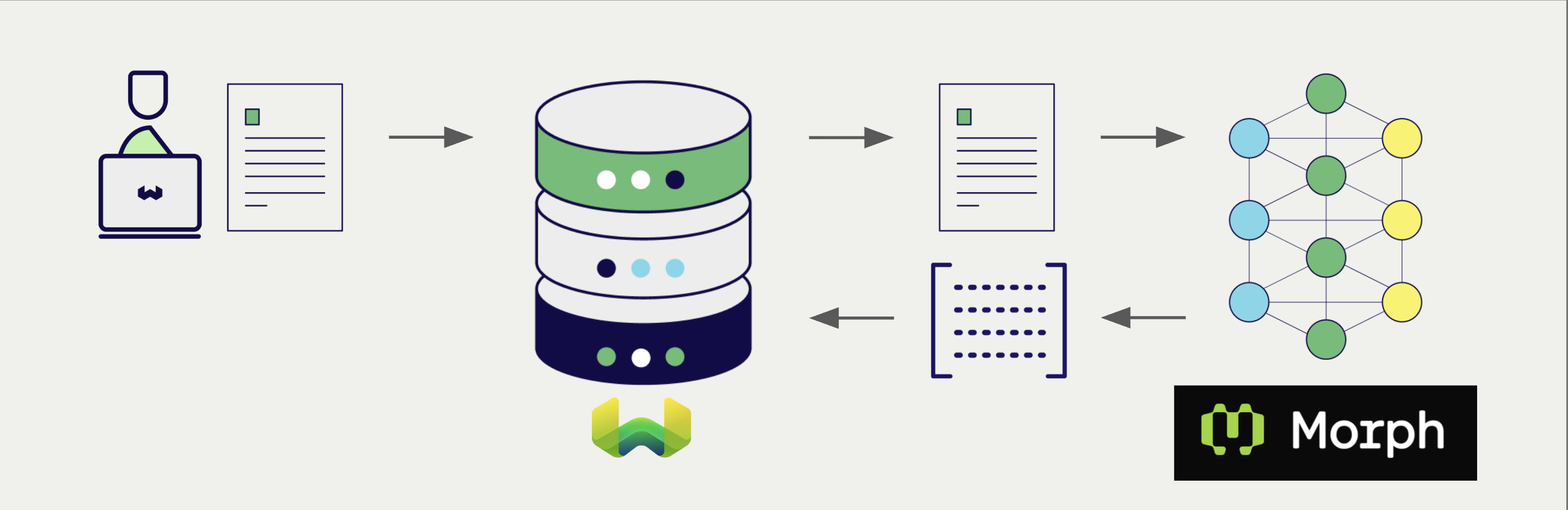
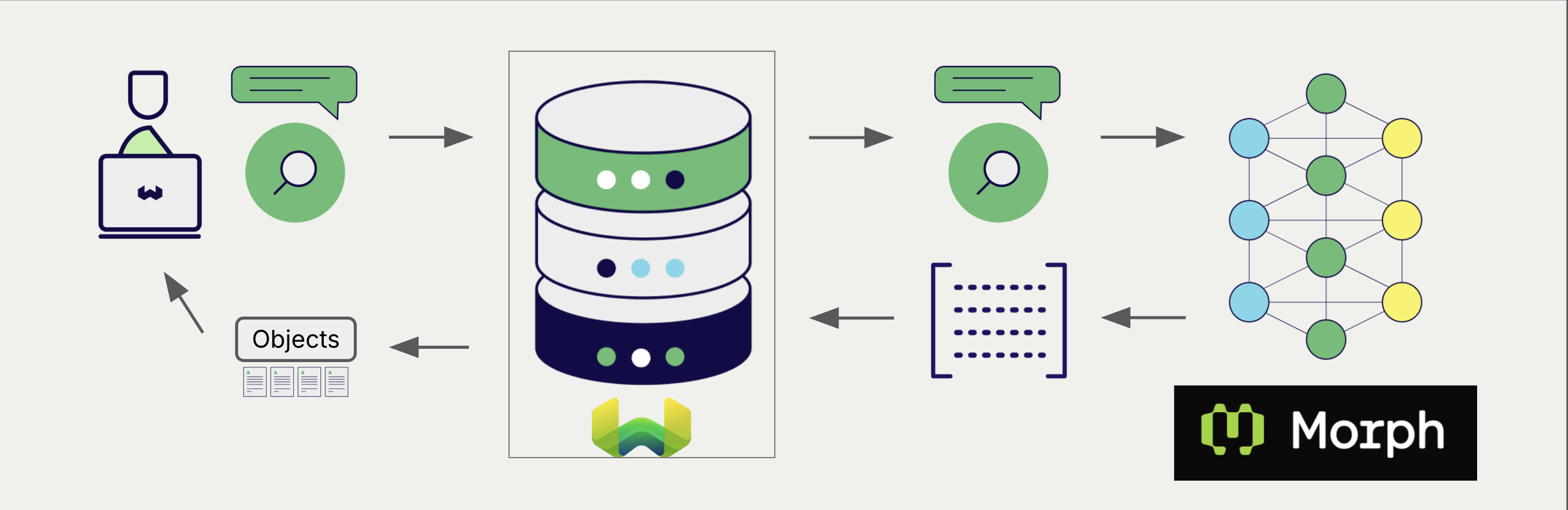
Configure a Weaviate vector index to use a Morph embedding model, and Weaviate generates embeddings for imports and searches automatically using your Morph API key. This is the vectorizer.
At import time, Weaviate generates text object embeddings and saves them into the index. For vector and hybrid search operations, Weaviate converts text queries into embeddings.
Requirements
Section titled “Requirements”Weaviate configuration
Section titled “Weaviate configuration”Your Weaviate instance must have the text2vec-morph module enabled. The module is available in Weaviate v1.32.6 and later.
For Weaviate Cloud (WCD) users
This integration is enabled by default on Weaviate Cloud (WCD) instances.
For self-hosted users
- Check the cluster metadata to verify if the module is enabled.
- Follow the how-to configure modules guide to enable the module in Weaviate.
API credentials
Section titled “API credentials”You must provide a Morph API key to Weaviate for this integration. Generate one in the Morph dashboard and supply it via one of:
- Set the
MORPH_APIKEYenvironment variable on the Weaviate server. - Provide the
X-Openai-Api-Keyheader at request time, as shown below.
Weaviate builds Morph requests with its OpenAI-compatible client, so the request header is X-Openai-Api-Key. There is no Morph-specific header. A key provided in the header takes precedence over the server environment variable.
# Recommended: save sensitive data as environment variables
morph_key = os.getenv("MORPH_APIKEY")const morphApiKey = process.env.MORPH_APIKEY || ''; // Replace with your inference API key// Best practice: store your credentials in environment variablesString weaviateUrl = System.getenv("WEAVIATE_URL");String weaviateApiKey = System.getenv("WEAVIATE_API_KEY");String morphApiKey = System.getenv("MORPH_APIKEY");// Morph requests are built by Weaviate's OpenAI-compatible client,// so the Morph key is supplied under the OpenAI header name.WeaviateClient client = WeaviateClient.connectToWeaviateCloud( weaviateUrl, weaviateApiKey, config -> config.setHeaders(Map.of("X-Openai-Api-Key", morphApiKey)));System.out.println(client.isReady()); // Should print: `True`client.close(); // Free up resources// Best practice: store your credentials in environment variablesstring weaviateUrl = Environment.GetEnvironmentVariable("WEAVIATE_URL");string weaviateApiKey = Environment.GetEnvironmentVariable("WEAVIATE_API_KEY");string morphApiKey = Environment.GetEnvironmentVariable("MORPH_APIKEY");// Morph requests are built by Weaviate's OpenAI-compatible client,// so the Morph key is supplied under the OpenAI header name.using var client = await Connect.Cloud( weaviateUrl, weaviateApiKey, headers: new Dictionary<string, string> { ["X-Openai-Api-Key"] = morphApiKey, });var meta = await client.GetMeta();Console.WriteLine(meta.Version);Configure the vectorizer
Section titled “Configure the vectorizer”Configure a Weaviate index to use a Morph embedding model by setting the vectorizer as follows:
from weaviate.classes.config import Configureclient.collections.create( "DemoCollection", vector_config=[ Configure.Vectors.text2vec_morph( name="title_vector", source_properties=["title"], ) ], # Additional parameters not shown)await client.collections.create({ name: 'DemoCollection', properties: [ { name: 'title', dataType: 'text' as const, }, ], vectorizers: [ weaviate.configure.vectors.text2VecMorph({ name: 'title_vector', sourceProperties: ['title'], }), ], // Additional parameters not shown});client.collections.create("DemoCollection",
col -> col
.vectorConfig(
VectorConfig.text2vecMorph("title_vector", c -> c.sourceProperties("title")))
.properties(Property.text("title"), Property.text("description")));await client.Collections.Create(
new CollectionCreateParams
{
Name = "DemoCollection",
VectorConfig = new VectorConfigList
{
Configure.Vector(
"title_vector",
v => v.Text2VecMorph(),
sourceProperties: ["title"]
),
},
Properties = [Property.Text("title"), Property.Text("description")],
}
);Vectorization behavior
Weaviate follows the collection configuration and a set of predetermined rules to vectorize objects.
Unless specified otherwise in the collection definition, the default behavior is to:
- Only vectorize properties that use the
textortext[]data type (unless skipped) - Sort properties in alphabetical (a-z) order before concatenating values
- If
vectorizePropertyNameistrue(falseby default) prepend the property name to each property value - Join the (prepended) property values with spaces
- Prepend the class name (unless
vectorizeClassNameisfalse) - Convert the produced string to lowercase
Vectorizer parameters
Section titled “Vectorizer parameters”model: The Morph model id. Defaults tomorph-embedding-v3.baseURL: The base URL prefix that requests are sent to. Any existing path is preserved whenendpointis appended. Defaults tohttps://api.morphllm.com.endpoint: The API path that Weaviate appends to the base URL. Defaults to/v1/embeddings. Set it if the service you target uses a different path.
For how Weaviate combines baseURL and endpoint into a request URL, see Header parameters.
Weaviate stores baseURL and model in the collection configuration even when you do not set them, because the module supplies a default for each. endpoint is different: it appears in the stored configuration only when you set it explicitly. If you read a collection back and see no endpoint, the default path applies.
No dimensions parameter is sent, so the embedding dimension is always the model's native size.
Example configuration
Section titled “Example configuration”The following examples set the Morph-specific options. Client libraries do not all expose the same options, so each example shows what that client supports.
from weaviate.classes.config import Configureclient.collections.create( "DemoCollection", vector_config=[ Configure.Vectors.text2vec_morph( name="title_vector", source_properties=["title"], model="morph-embedding-v3", base_url="https://api.morphllm.com", # Base URL; an existing path is preserved endpoint="/v1/embeddings", # Path appended to the base URL ) ], # Additional parameters not shown)await client.collections.create({ name: 'DemoCollection', properties: [ { name: 'title', dataType: 'text' as const, }, ], vectorizers: [ weaviate.configure.vectors.text2VecMorph({ name: 'title_vector', sourceProperties: ['title'], model: 'morph-embedding-v3', baseURL: 'https://api.morphllm.com', // Base URL; an existing path is preserved }), ], // Additional parameters not shown});client.collections.create("DemoCollection",
col -> col
.vectorConfig(VectorConfig.text2vecMorph("title_vector",
c -> c.sourceProperties("title")
.model("morph-embedding-v3")
.baseUrl("https://api.morphllm.com") // Base URL; an existing path is preserved
.endpoint("/v1/embeddings"))) // Path appended to the base URL
.properties(Property.text("title"), Property.text("description")));await client.Collections.Create(
new CollectionCreateParams
{
Name = "DemoCollection",
VectorConfig = new VectorConfigList
{
Configure.Vector(
"title_vector",
v => v.Text2VecMorph(model: "morph-embedding-v3"),
sourceProperties: ["title"]
),
},
Properties = [Property.Text("title"), Property.Text("description")],
}
);Header parameters
Section titled “Header parameters”You can provide the API key and the base URL at runtime through headers. Headers provided at request time take precedence over the collection configuration and over the server environment variable:
X-Openai-Api-Key: The Morph API key for this request.X-Openai-Baseurl: The base URL to use instead of the default.
Provide the headers as shown in the API credentials examples above.
Data import
Section titled “Data import”After configuring the vectorizer, import data into Weaviate. Weaviate generates embeddings for text objects using the configured model.
Searches
Section titled “Searches”Once the vectorizer is configured, Weaviate performs vector and hybrid searches using the specified Morph model.
Vector (near text) search
Section titled “Vector (near text) search”When you perform a vector search, Weaviate converts the text query into an embedding using the configured Morph model and returns the most similar objects.
Hybrid search
Section titled “Hybrid search”When you perform a hybrid search, Weaviate fuses keyword and vector ranking. The text query is embedded with the configured Morph model; the keyword side uses Weaviate's inverted index.
References
Section titled “References”Available models
Section titled “Available models”Weaviate does not restrict which model id you can set, so any model the Morph API accepts can be used. morph-embedding-v3 is the default. Morph's list models endpoint returns the model ids your key can use. Check it before you rely on a model id, as availability and dimensions can change.
Further resources
Section titled “Further resources”Other integrations
Section titled “Other integrations”Code examples
Section titled “Code examples”Once the vectorizer is configured, Weaviate handles model inference transparently. The standard client library how-tos apply unchanged. No Morph-specific code is required at query or import time beyond the configuration shown above.
Questions and feedback
Section titled “Questions and feedback”Have a question or feedback? Here's how to reach us.