Google + Weaviate
Google offers a wide range of models for natural language processing and generation. Weaviate seamlessly integrates with Google Gemini API and Google Vertex AI APIs, allowing users to leverage Google's models directly from the Weaviate Database.
These integrations empower developers to build sophisticated AI-driven applications with ease.
Integrations with Google
Section titled “Integrations with Google”Embedding models for vector search
Section titled “Embedding models for vector search”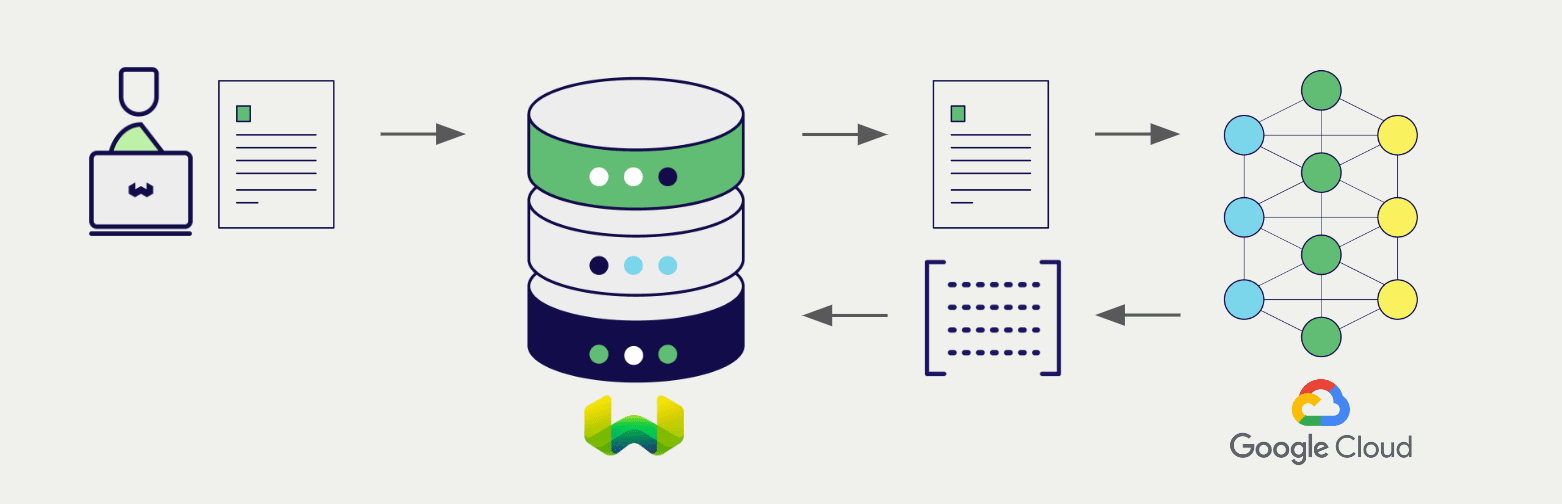
Google's embedding models transform text data into vector embeddings, capturing meaning and context.
Weaviate integrates with Google's embedding models to enable seamless vectorization of data. This integration allows users to perform semantic and hybrid search operations without the need for additional preprocessing or data transformation steps.
Google embedding integration page
Google multimodal embedding integration page
Generative AI models for RAG
Section titled “Generative AI models for RAG”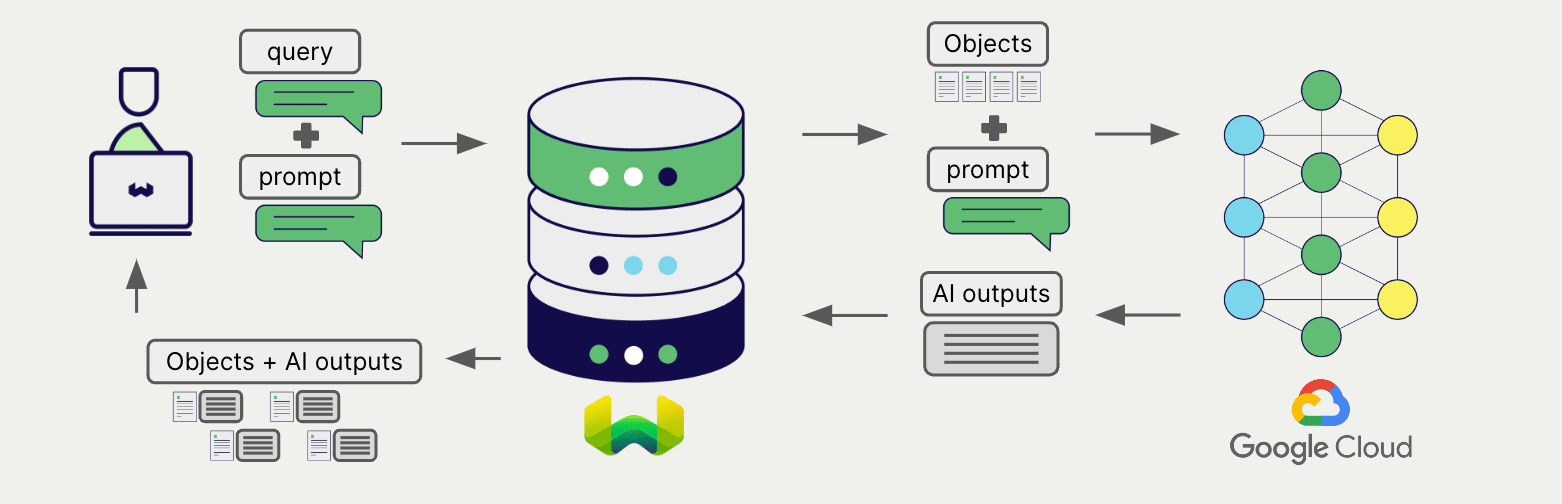
Google's generative AI models can generate human-like text based on given prompts and contexts.
Weaviate's generative AI integration enables users to perform retrieval augmented generation (RAG) directly from the Weaviate Database. This combines Weaviate's efficient storage and fast retrieval capabilities with Google's generative AI models to generate personalized and context-aware responses.
Google generative AI integration page
Summary
Section titled “Summary”These integrations enable developers to leverage Google's powerful models directly within Weaviate.
In turn, they simplify the process of building AI-driven applications to speed up your development process, so that you can focus on creating innovative solutions.
Credentials
Section titled “Credentials”You must provide valid Google API credentials to Weaviate for these integrations.
Vertex AI
Section titled “Vertex AI”Automatic token generation
Section titled “Automatic token generation”You can save your Google Vertex AI credentials and have Weaviate generate the necessary tokens for you. This enables use of IAM service accounts in private deployments that can hold Google credentials.
To do so:
- Set
USE_GOOGLE_AUTHenvironment variable totrue. - Have the credentials available in one of the following locations.
Once appropriate credentials are found, Weaviate uses them to generate an access token and authenticates itself against Vertex AI. Upon token expiry, Weaviate generates a replacement access token.
In a containerized environment, you can mount the credentials file to the container. For example, you can mount the credentials file to the /etc/weaviate/ directory and set the GOOGLE_APPLICATION_CREDENTIALS environment variable to /etc/weaviate/google_credentials.json.
Search locations for Google Vertex AI credentials
Once USE_GOOGLE_AUTH is set to true, Weaviate will look for credentials in the following places, preferring the first location found:
- A JSON file whose path is specified by the
GOOGLE_APPLICATION_CREDENTIALSenvironment variable. For workload identity federation, refer to this link on how to generate the JSON configuration file for on-prem/non-Google cloud platforms. - A JSON file in a location known to the
gcloudcommand-line tool. On Windows, this is%APPDATA%/gcloud/application_default_credentials.json. On other systems,$HOME/.config/gcloud/application_default_credentials.json. - On Google App Engine standard first generation runtimes (<= Go 1.9) it uses the appengine.AccessToken function.
- On Google Compute Engine, Google App Engine standard second generation runtimes (>= Go 1.11), and Google App Engine flexible environment, it fetches credentials from the metadata server.
Get started
Section titled “Get started”Weaviate integrates with both the Google Gemini API and Google Vertex AI.
Go to the relevant integration page to learn how to configure Weaviate with the Google models and start using them in your applications.
Questions and feedback
Section titled “Questions and feedback”Have a question or feedback? Here's how to reach us.